Defining a Calculated Signal (Predefined Calculation Formula)
In the Define Calculated Signals dialog box, you have activated the Custom field.
To define a calculated signal:
Select a calculation formula from the list to the right of the Bit field.
The Description field displays a brief description of the selected calculation formula. The Parameter assignment fields displays the parameters.
Enter a name for the calculated signal.
- Optionally, you can enter a unit of measurement for the calculated signal.
In the Assign input field, select values for the parameters.
You can use the following input:
 Measured Signal
Opens the Variable Selection dialog box in which you select a measured signal for the definition of the calculated signal.
Calculated SignalOpens the Available Calculated Signals dialog box in which you select an already calculated signal as input value for the definition of the newly calculated signal.
Measure TimeInserts a variable for the relative calculation period. This variable returns the relative time in seconds between the start of measurement and the calculation of the signal. The measurement time can be used for standardizing time-dependent values.
ConstantsOpens the Available Constants dialog box in which you select a predefined constant for the definition of the calculated signal.
Define a calculation rate:
Fixed rate [ms] radio buttonSpecifies the duration of the calculation period.
Same as signal radio buttonSpecifies the signal used as calculation rate.
Select All from the list to use a calculation rate that results from the combination of all rasters of all input signals.
or
- From the list, select the entry for the input signal whose calculation rate you want to use.
Define whether a text conversion table is to be stored and, if so, which one:
None radio buttonDefines that no conversion is used.
Verbal radio buttonDefines that a verbal description is stored.
- Click Define.
In the Conversion Table dialog box, enter a value and a text.
Click Check to check the syntax of the formula.
The newly defined calculated signal is checked and, if the check is successful, it is accepted. If the formula contains any errors, the check result is displayed.
- Click OK.
Calculating Fuel Consumption
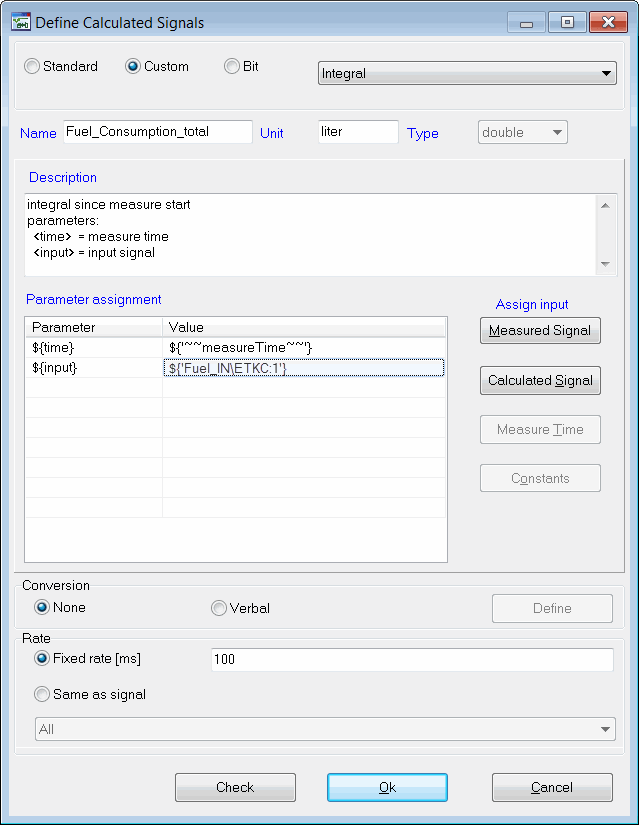
The current fuel consumption is measured directly in liter per seconds. To determine the consumption in total the individual consumption values have to be summed up. This means that the calculated signal is simply an integration of the current consumption over the operation time of the engine.
Therefore the total fuel consumption can be calculated using the predefined formula Integral. This formula is defined in the DefineCalculated Signals dialog box in the following way:
Calculated signal in INCA / MDA for total fuel consumption
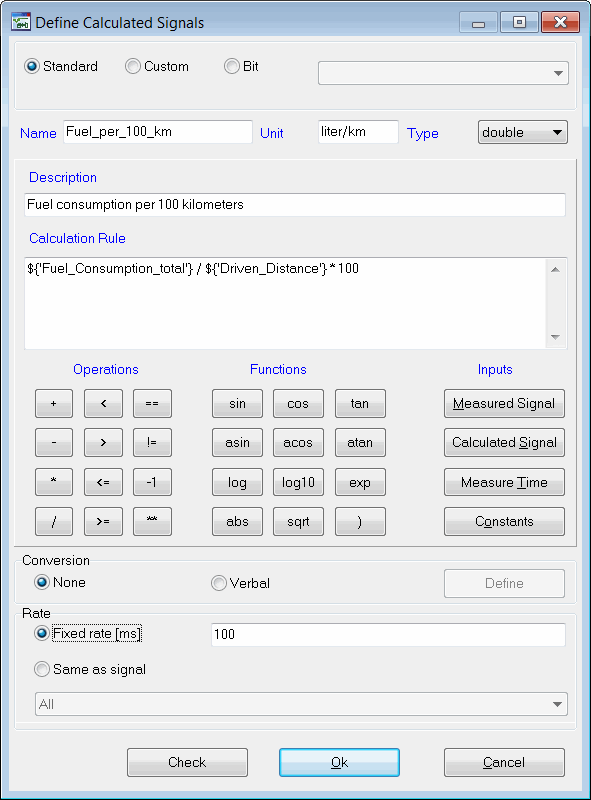
In a similar way it is possible to integrate the current speed over the distance driven. By dividing the total fuel consumption by the distance multiplied by 100, the relative fuel consumption in liters per 100 km can be determined. The calculation formula can be defined in the Define Calculated Signals dialog box in the following way, e.g. by referring to further calculated signals:
Calculated signal in INCA / MDA for fuel consumption per 100 km
See also
Predefined Calculation Formulas in the Formula Library