Database Objects
INCA provides the following database objects:
Database Object | Icon | Description | ||||||||||||
|---|---|---|---|---|---|---|---|---|---|---|---|---|---|---|
| A workspace is a database object containing all information necessary to perform a specific measurement or calibration task. This gives you central access to all data so that you can manage and edit it if necessary. The workspace contains:
| |||||||||||||
| An experiment is a database object that contains the settings for a specific application test or a specific measurement task. An experiment contains the information about which variables are displayed in windows. In addition, an experiment contains the display settings in the individual measurement and calibration windows as well as the measurement control information, e.g., the measure time and trigger condition. This information is sorted in the database as a unit and can therefore be reused. INCA V7.1 introduced new YT and XY oscilloscope types. Within one experiment only one type of oscilloscopes can be used (see also Compatibility between oscilloscopes and INCA versions). However, you can have different experiments in your database where some contain oscilloscopes of the new type and others of the old type. When you open in INCA V7.1 an experiment for the first time which supports or even contains old oscilloscope types, you will be asked whether the experiment shall be converted to support new oscilloscope types exclusively. An experiment supporting old oscilloscopes is marked in the database manager with the | |||||||||||||
| A project is generated by reading the project description file (*.a2l) and stored as a database object in the database. It contains descriptions of all management information of an ECU project, such as variable names, ECU addresses and memory layouts. The devices suitable for the project are also defined in the project description file. You can also select and configure further devices, such as measurement hardware in the hardware configuration editor. In the database manager, a project is marked with the following icons:
| |||||||||||||
| In INCA, you work with three types of dataset:
When the first HEX file is read, and it contains code, the code part, i.e.,
the actual program, is assigned to the selected project. The assignment of code is indicated by the icon used for the project Reference and working datasets are usually generated as copies of the master dataset. When further HEX files are read, if possible a check is made to determine whether the code part matches the stored code part of the master dataset. If so, the data part is stored as a further dataset and can then be used as a reference or working dataset. If not, you receive an error message. The different data statuses of a working and reference page are managed in INCA separately as a working dataset and a read-only reference dataset. Display in INCA:
| |||||||||||||
| A CDM configuration contains settings you have made in the Calibration Data Manager (CDM). In the Calibration Data Manager, you can administer and analyze the datasets generated in test series. | |||||||||||||
| A measure catalog is a description file for external measure variables such as temperature or pressure. This file contains the channel parameters, which can be assigned to the respective channel. | |||||||||||||
| The ECU documentation contains descriptions of measurement and calibration variables. The ECU Documentation is provided by the ECU manufacturer. The entry in the INCA database contains only the link to the ECU documentation in the directory. In INCA, you can assign the ECU documentation to a project. | |||||||||||||
| AUTOSAR (AUTomotive Open System ARchitecture) files are description files in XML format (*.arxml). They describe the AUTOSAR system, e.g. the system topology including data busses and clustering, the software components, and the hardware. INCA uses only the CAN and CAN FD bus descriptions (CAN clusters) from the AUTOSAR system templates. | |||||||||||||
| CAN-DB files are description files for monitoring messages exchanged on the CAN bus. This method is also known as CAN monitoring. | |||||||||||||
| A CAN message list contains the CAN messages sent to a CAN output device. | |||||||||||||
You can import CAN messages from CANalyzer LOG files to your database. A CAN message list is generated. | ||||||||||||||
|
FIBEX (FieldBusExchangeFormat) files are description files in XML format for monitoring messages exchanged in the FlexRay environment. This method is known as FlexRay monitoring. | |||||||||||||
LDF |
|
LDF (LIN Description File, *.ldf) is as part of the LIN specification a homogenous format for the description of an entire LIN network. In INCA, LIN files are supported on the signal value layer. The LDF format contains symbolic information regarding senders, messages and signal values with physical conversions. The LDF file additionally contains information about the arrangement of frames and LIN nodes. It is possible to write an LDF file to the file system with the command Write LDF in the context menu. |


 icon.
icon.


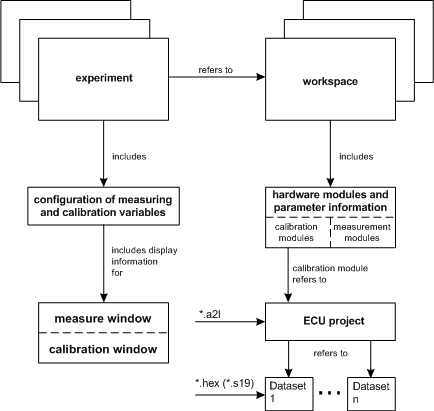
Relations Between Database Objects
This diagram shows the relations between database objects: