Support Function in Case of System Errors
While developing INCA, the functional safety of the program was of utmost importance. Should an error occur nevertheless, please forward the following information to ETAS:
- Which step were you about to perform with INCA when the error occurred?
- What kind of error occurred (wrong function, system error or system crash)?
Sending Problem Reports Using the System Error Window
If a critical system error occurs, the following window appears:
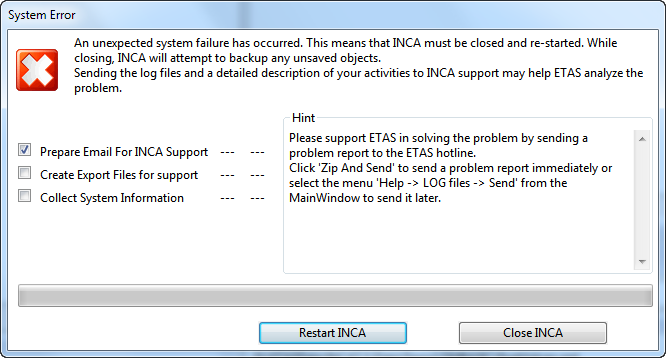
Checkbox Prepare Email For INCA Support
If this checkbox is checked, an e-mail application will be launched and an e-mail opened. Enter a description of the observed problem and how it can be reproduced. The log files saved by INCA, and optionally the export file, are automatically attached to the e-mail. The e-mail is addressed to the INCA support address.
Checkbox Create Export Files for Support
If this checkbox is checked, the active workspace including all referenced items (e.g. experiment, project and datasets) will be saved in binary format in an export file. This export file includes all log information that is required for analyzing the problem and will be added to the e-mail for the INCA support team.
Note
All information and data provided to ETAS will be treated as strictly confidential and will only be used internally by ETAS for solving the issue.
Checkbox Collect System Information
If this checkbox is checked, INCA collects information on the connected hardware and its status and writes it to the log files.
Sending Problem Reports Using Zip and Send
If you want to send a problem report later:
In the ? menu, select Log Files.
To zip the log files, select Zip.
Enter a problem description. With the checkbox , you can select whether you want to send only log files or also an export of the current workspace including all referenced items (e.g. experiment, project, datasets).
INCA compresses the entire contents of the .log. directory (all *.log files) including the textual description, plus optionally the INCA export file, into an archive file named EtasLogFiles[01].zip in the .\ETAS\LogFiles\ subdirectory. For additional archive files, the file name is incremented automatically (up to [20]) to avoid that older archive files are immediately overwritten.
If you want to check the log files before sending, select View.
If you want to send a previously prepared ZIP archive, select Send.
A new e-mail addressed to the INCA support is opened. The ZIP archive with the log files is already attached to the mail.