ASAM MCD 3MC Window
The window contains the following components:
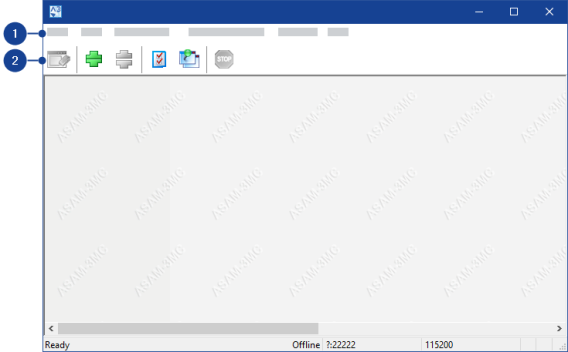
 1 Menubar
The ASAM MCD 3MC window contains the following menus:
File menuThis menu contains the following functions:
Clear Window
Clears the contents in the display area of the ASAM MCD 3MC window.
Exit
Closes the ASAM MCD 3MC window.
Note |
Before closing the interface, make sure that communication between INCA and the test bench is finished. |
Edit menuThis menu contains the following functions:
Copy
Copies the marked text to the clipboard.
Select All
Marks the entire text in the display area of the ASAM MCD 3MC window.
Connection menuThis menu contains the following functions:
Establish Connection
Opens the Establish Connection dialog box in which you can specify the connection parameters for the connection to the test bench.
Break Connection
Disconnects the interface from the test bench.
Note |
Before disconnecting, make sure that communication between INCA and the test bench is finished. |
ASAM-3MC Stop! menuThis menu function resets the current ASAM MCD 3MC session.
Extras menuThis menu contains the following functions:
Options
Opens the Options dialog box in which you can define settings for the interface.
Export Current Options
Opens a dialog box for specifying an INI file to which the current settings of the interface are exported.
Always On Top
Keeps the ASAM MCD 3MC window permanently in front of other windows.
Help menuThis menu contains the following functions:
Help
Opens the online help of the interface.
Contents and Index
Opens the contents or index of the online help.
Context Help
Switches the mouse pointer to the mode for displaying the context-sensitive online help.
About ASAM-3MC
Opens an information window on the interface.
2 ToolbarThe toolbar contains the following icons:
| Clears the contents in the display area of the ASAM MCD 3MC window. | ||
| Opens the Establish Connectiondialog box in which you can specify the connection parameters for the connection to the test bench. | ||
| Disconnects the ASAP3 / iLinkRT interface from the test bench.
| ||
| Opens the Options dialog box in which you can define settings for the ASAP3 / iLinkRT interface. | ||
| Keeps the ASAM MCD 3MC window permanently in front of other windows. | ||
| Resets the current ASAP3 / iLinkRT session. |


The window logs the ASAP3 / iLinkRT V2.0 or iLinkRT V3.0 commands and responses in the display area if there is a connection to the test bench.