64 Bit Integer Support
INCA supports 64 bit integer data types for measurement and calibration variables implemented in the ECU.
When INCA converts the ECU implemented values to the physical model, INCA uses variables of the data type double (float) with a cast mechanism. However, there are some restrictions for large values that need more than 52 bits from the 64 bit integers. The data type double offers only 52 bits as mantissa. The remaining bits are used for the exponent and the sign. This means that large values can be transferred to double but precision may be lost since the lower bits are cut of by casting.
When integer variables are used on the ECU with large values that need more than 52 bits, the calculated physical values are rounded to floating point variables of type double. This leads to a precision loss.
If counters or bit arrays are stored in these 64 bit integer variables, the values on the physical side may not be correct.
In INCA, use for displaying and editing 64 bit counters or 64 bit arrays only hexadecimal, binary, or decimal representation. This avoids computation to physical values.
The following figure shows the conversion between ECU internal value and physical value:
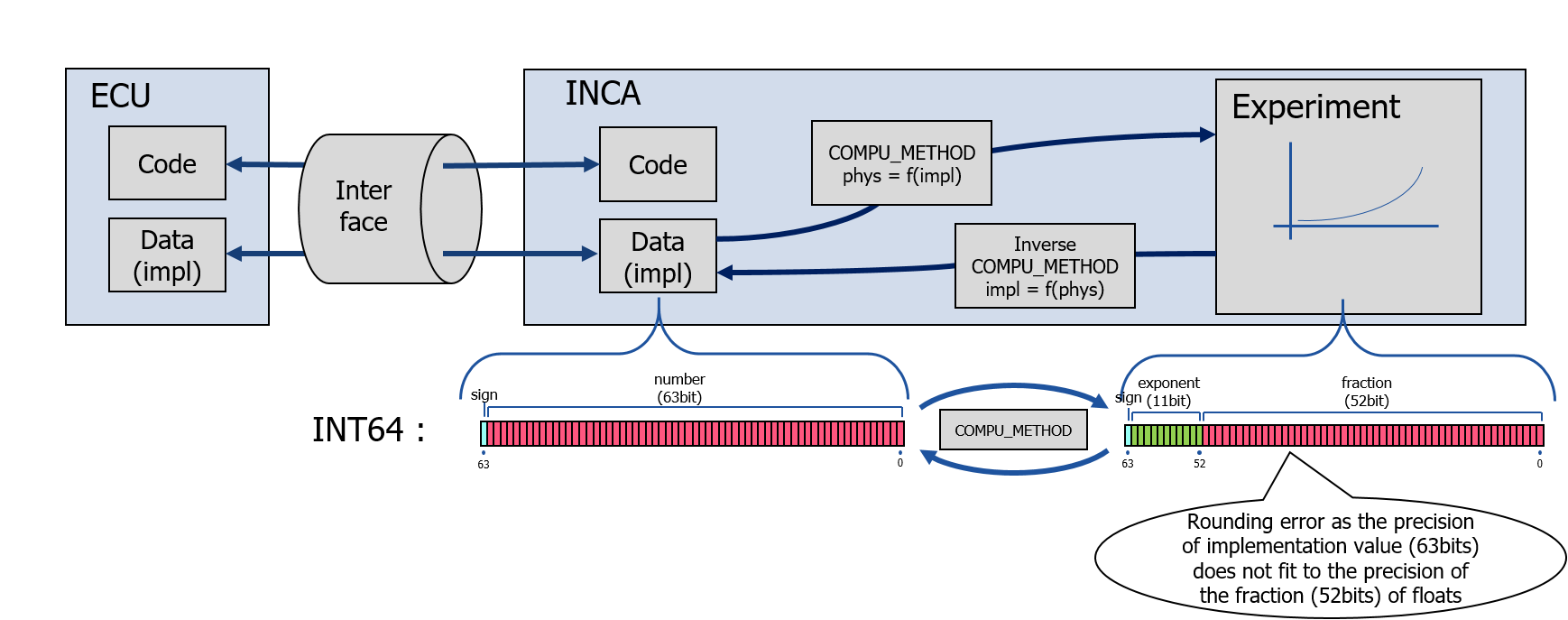
64 bit Integer Restrictions
The following table lists checks performed by INCA and warning messages which prohibit unintended results during calibration.
Editors in INCA Experiment | If a calibration variable contains a value with more than 52 bits, INCA switches the editor to hex view. |
Customer Instrument Widgets Interface in INCA Experiment | If the client tries to read a 64 bit integer parameter that holds a value greater than 52 bit, INCA returns an error. |
CDM Copy Action | The Calibration Data Manager (CDM) copy action works in physical mode. If a 64 bit integer parameter of the source holds a value greater than 52 bits, INCA writes a warning to the result file (warning.lab) and continues to run. |
CDM List Action | All data exchange formats require physical values. If a 64 bit integer parameter holds a value greater than 52 bits, INCA writes a warning to the result file (warning.lab) and continues to run. |
CDM Compare Action | The CDM compare action supports hexadecimal and physical compare. In case of physical compare and a 64 bit integer parameter with a value greater than 52 bits, INCA writes a warning to the result file (warning.lab) and continues to run. |
CDM Instant Compare | The CDM instant compare allows a quick overview of the currently visualized parameters. It uses only physical compare. For 64 bit integer parameters with values greater than 52 bit, the CDM does not detect small differences. |
INCA COM API | The API client gets the calculated physical value regardless of the size of the implementation value. INCA does not check for precision loss. |
INCA RCI2 Interface for Measurement Values | The RCI2 client gets the calculated physical value regardless of the size of the implementation value. INCA does not check for precision loss. |
INCA-MCE | INCA-MCE does not support 64 bit values. |
INCA-MIP / INCA-SIP | For MDF the implementation value is used. There is no restriction. |
Calculated / Virtual / Trigger Signals | INCA does the calculation on the physical side and casts it to |
Recording | For MDF the implementation value is used. There is no restriction. |
E-Target | 64 bit integer values are not supported. |
Dependent Parameter | INCA calculates always as physical value. If a hexadecimal value is referenced, INCA casts it to If a 64 bit integer holds a value greater than 52 bit, INCA generates a warning message in the INCA monitor window and continues to run. |
Measure Calibrations | With measure calibrations, INCA always uses physical values. If a hexadecimal value is referenced, INCA casts it to |