Status indicator
The ES166.1 displays the device status and the connection speed to the host with colored LEDs.
Connection Status of Automotive Ethernet (AE)
Default connection mode and connection speed after a restart: Auto
Device Power state information
On
|
LED code |
Display |
State |
|---|---|---|
|
|
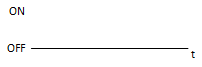
Off |
Power off |
|
|
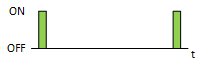
Flashing green |
Standby |
|
|
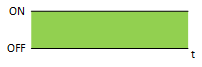
Lit green |
Power on |
Time synchronization
Sync
|
LED code |
Display |
State |
|---|---|---|
|
|
Off |
No synchronization |
|
|
Flashing blue |
Module is synchronisation master |
|
|
Lit blue |
Module receives external synchronisation |
|
|
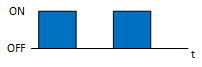
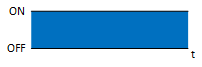
Flashing blue |
Functionality check ongoing. Flashing in combination with following LEDS: |
Error LED
Error/Busy
|
LED code |
Display |
State |
|---|---|---|
|
|
Off |
Operational |
|
|
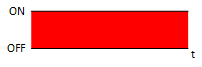
Lit red |
Functional error |
|
|
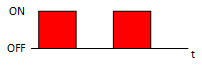
Flashing red |
Device is busy e. g. updated |
|
|
Flashing red |
Functionality check ongoing. Flashing in combination with following LEDS: |
HOST area
1000 Mbit
|
LED code |
Display |
State |
|---|---|---|
|
|
Off |
No link established |
|
|
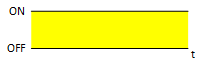
Lit yellow |
Link established (1000M) |
|
|
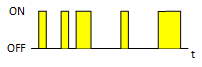
Irregular flashing yellow |
Traffic on (1000M) |
100 Mbit
|
LED code |
Display |
State |
|---|---|---|
|
|
Off |
No link established |
|
|
Lit yellow |
Link established (100M) |
|
|
Irregular flashing yellow |
Traffic on (100M) |
Mode
Media Converter
|
LED code |
Display |
State |
|---|---|---|
|
|
Off |
Device off or gateway mode selected |
|
|
Lit green |
Media converter mode selected |
|
|
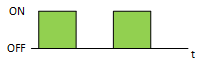
Flashing green |
Functionality check ongoing. Flashing in combination with following LEDS: |
Gateway
|
LED code |
Display |
State |
|---|---|---|
|
|
Off |
Device Off or media converter mode selected |
|
|
Lit green |
Gateway mode selected |
|
|
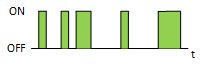
Irregular flashing green |
Traffic on T1S bus |
|
|
Flashing green |
Functionality check ongoing. Flashing in combination with following LEDS: |
Injection
|
LED code |
Display |
State |
|---|---|---|
|
|
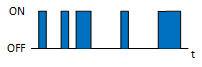
Irregular flashing blue |
Transmit to T1S bus |
|
|
Flashing blue |
Functionality check ongoing. Flashing in combination with following LEDS: |
PLCA
PLCA Coordinator
|
LED code |
Display |
State |
|---|---|---|
|
|
Off |
PLCA disabled or device configured as PLCA Follower |
|
|
Lit blue |
Device configured as Coordinator |
|
|
Flashing blue |
Invalid PLCA configuration |
|
|
Flashing blue |
Functionality check ongoing. Flashing in combination with following LEDS: |
PLCA Follower
|
LED code |
Display |
State |
|---|---|---|
|
|
Off |
No activity or PLCA disabled or device configured as PLCA Coordinator |
|
|
Lit blue |
Device configured as Follower |
|
|
Flashing blue |
Invalid PLCA configuration |
|
|
Flashing blue |
Functionality check ongoing. Flashing in combination with following LEDS: |