EATB GUI
EATB GUI is a web interface that supports you to generate and evaluate reports. EATB is launched in your default web browser.
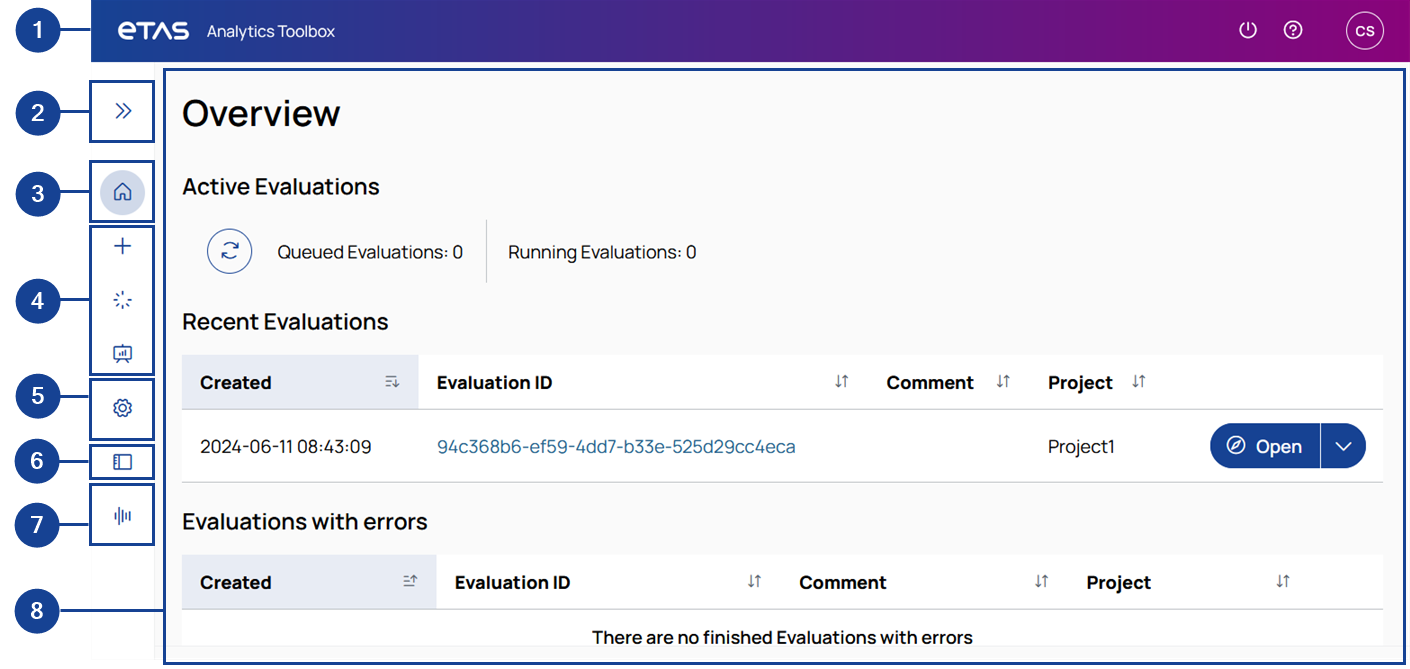
|
No. |
Description |
|---|---|
|
|
Toolbar: Set your user profile, get additional information, or close EATB GUI. |
|
|
Sidebar arrow: Close or open the sidebar view. |
|
|
Overview: Get a quick overview of your reports. |
|
|
Reports: Create a new report, check the report progress, or maintain your created reports. |
|
|
Configurations: Select one of your existing configurations and continue working with it. |
|
|
Configuration Creator: Configure display objects and reports. |
|
|
Signals: Create new signals, import, and export config_signals.csv. |
|
|
Main window: Displays the information that you have selected via the sidebar buttons (numbers 3-7 above). |


See also: