Add calculated signals
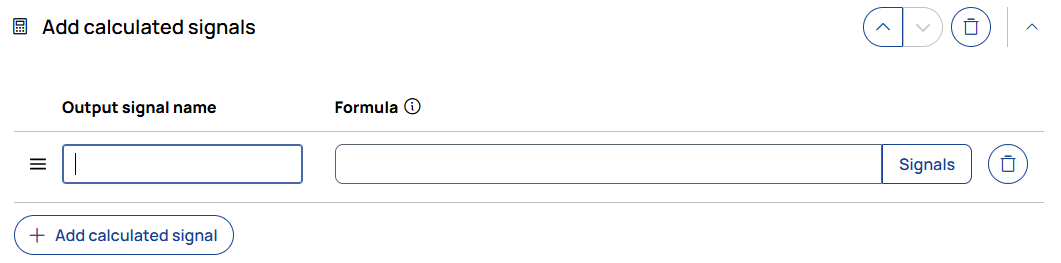
Adds a new calculated signal with its own formula and name.
Output signal name
Enter a name for the new signal that will be created.
To assign the output signal to a device, use label\device. The last backslash separates the signal label from the device name.
Formula
Enter a formula using existing signal names.
The supported autocompletion is based on the signal sources defined in the Sources step.
Autocomplete lists signals as label and, where available, label\device. If the same label exists on multiple devices, select the entry for the required device. Autocomplete also suggests signal IDs already mapped for this formula.
Formulas use Python syntax, but with limited supported features. NumPy is available via np.
The result of the formula must have the same length as the input signals.
Modifying time or sampling rate is not supported.
Example: np.sqrt(signal_name)
|
Note |
|---|
|
Only a subset of Python syntax is supported. For supported syntax, signal naming requirements, validation behavior, and available functions, see Formulas and conditions. |
Signals
Opens the formula's Signal mappings dialog. Each formula has its own mappings; mappings are not shared with other formulas, operations, or workflows.
The dialog lists each Signal ID and its associated Candidate signals. The candidate signal is the signal represented by that ID in the formula. If there are no mappings yet, the dialog displays No signal mappings.
To add a mapping, click Add signal, enter a valid Python identifier in Signal ID, and choose a candidate signal from its drop-down list. To edit a mapping, change its signal ID or candidate signal. To delete it, click the trash icon on its row. Click Save to save the changes or Cancel to discard them.
Signal IDs used in formulas must be valid Python identifiers: they start with a letter or underscore and contain only letters, digits, and underscores. They must not be Python reserved keywords. When a device-specific signal is selected, backslashes in its name are replaced with __; other characters that are not valid in an identifier are replaced with _. If this produces an ID that is already in use, a suffix such as _1 or _2 is added to make it unique.

Adds a new calculated signal with its own formula definition.