System Configuration
The System configuration structures the TOE and, therefore, the TARA in a hierarchical way. It generally works analogously to the TOE configuration.
You can create the system configuration items on the System configuration page. There are four hierarchy levels for the system configuration items as follows:
- Product
- Project
- Data
- Component
To create system configuration items
- Go to the Home menu > Click Add icon.
The drop-down menu is displayed.
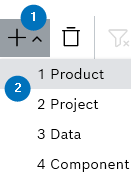
- Select the configuration items.
The system configuration item is created.
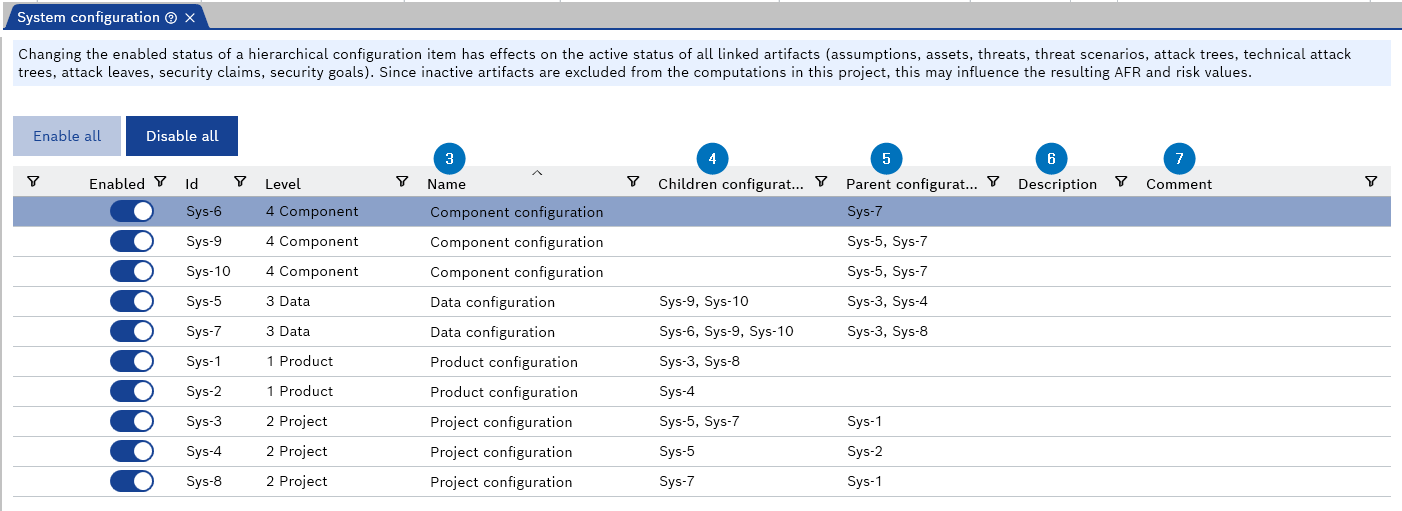
- Enter Name of the item.
- Select the child items from the Children configurations drop-down menu.
|
Note |
|---|
|
The children configurations are automatically kept in sync with the parent configurations. You can select an item below the hierarchy level; the lowest hierarchy level does not have child items. |
- Select the parent items from the Parent configurations drop-down menu.
|
Note |
|---|
|
The parent configurations are automatically kept in sync with the children configurations. You can select an item above the hierarchy level; the highest hierarchy level does not have parent items. |
- Enter Description of the item.
- Enter Comment of the item. This step is optional.
.