Copy and Paste TARA Artifacts between and within Projects
You can copy and paste a single or multiple TARA artifacts along with all linked items from one project to another only if the methodologies are compatible. To multi-select several artifacts, use Ctrl+Click for arbitrary artifacts and Shift+Click for a range of artifacts.
The copy and paste functionality helps to copy the following artifacts:
- TOE configuration
- Assumptions
- Security controls
- Security properties
- Attack trees
- Technical attack trees
- Circumvent trees
- Security claims
To copy the TARA artifacts
- Perform one of the following steps:
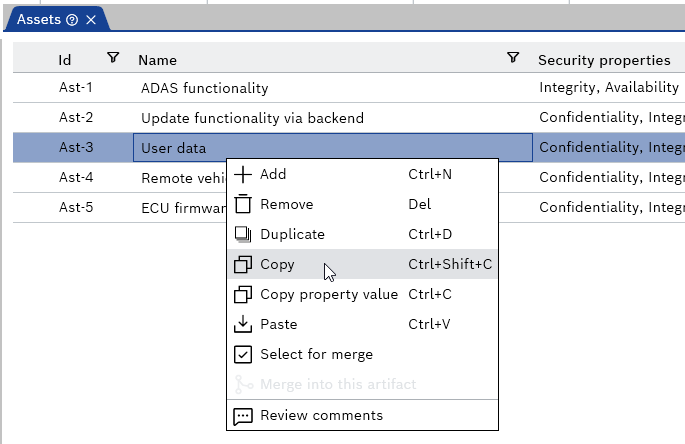
- Right-click the artifact and select Copy from the context menu.
- Select the artifact and click Copy icon from the "Home" menu.
- Press Ctrl+Shift+C.
- Right-click the artifact and select Copy from the context menu.
The "Please select the linked item types to be copied:" pop-up is displayed.
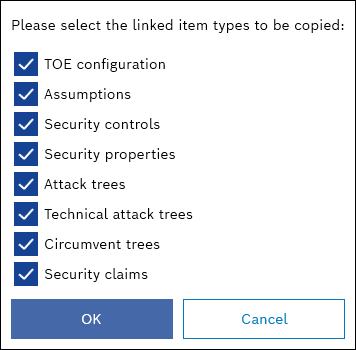
- Activate or deactivate the check boxes to copy the linked item types.
- Click OK.
The selected artifacts are copied.
- Perform one of the following steps:
- Right-click and select Paste from the context menu.
- Click Paste icon from the "Home" menu.
- Press Ctrl+V.
- Right-click and select Paste from the context menu.
- The copied artifacts are pasted.