Model Configurations: Dynamic Gaussian Mixture Model
Model > Configurations
When you select the Dynamic Gaussian Mixture Model modeling method, the Model Configuration area of the <output> tab contains the following elements. For each output there is a separate tab.
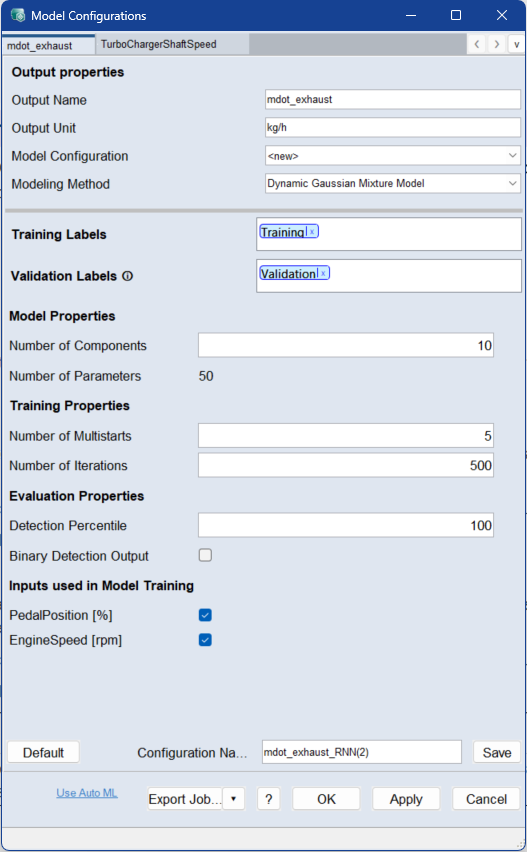
See Model Configurations (ASCMO-DYNAMIC), for a description of the Output Properties area and the button row on the bottom of the window.
Training Labels
Assign the labels you want to train the model on. If you use multiple labels, all data associated with at least one of the labels is used.
Assign a label by double-clicking the field and typing the name. Select the dataset from the list of suggestions.
Use the x on the label or Del to remove the label.
Validation Labels
Assign the labels of the data you want to use as validation data. If you use multiple labels, all data associated with at least one of the labels is used.
Assign a label by double-clicking the field and typing the name. Select the dataset from the list of suggestions.
Use the x on the label or Del to remove the label.
|
Note |
|---|
|
If the validation labels are not assigned to any data, the model is trained without validation. A message appears in the log window. You can assign labels to data in the Manage Datasets window. |
Model Properties
Number of Components
Enter the number of components for the Gaussian Mixture Model.
The number of components defines how many probability regions the model can use to describe the learned data distribution.
A higher value can represent more complex data distributions, but increases the model size and the computational effort.
Number of Parameters
Dynamically shows the number of parameters used by the model training for current settings.
Training Properties
Number of Multistarts
Enter the number of training repetitions with different starting values. A higher value can improve the model quality, but the model training then takes more time.
Enter the number of iterations to be performed during model training. If the model performance does not improve within 10 iterations on the validation data, the training will be aborted. In deep learning this is often referred to as number of epochs.
Evaluation Properties
Detection Percentile
Enter the percentage of data points that should be considered normal when defining the log-probability threshold.
For values in the range [0, 100], the threshold is determined from the data. For example, a value of 99 means that 1% of the data points with the lowest log-probability are considered anomalies.
For values greater than 100, a safety buffer is added beyond the 100th percentile. The threshold is calculated as follows:
min(log-probabilities) - (max(log-probabilities) - min(log-probabilities)) * (p - 100) / 100
Binary Detection Output
Activate this checkbox if you want to display a binary output instead of the raw log-probabilities.
If this option is activated, the model outputs 1 for anomalies and 0 for normal data points. The binary value is determined by comparing the log-probability with the specified threshold.
Inputs used in Model Training
This area lists all inputs of the model.
Activate the checkbox of an input to include it in model training. Deactivate the checkbox to exclude it.
For Model Monitoring projects, this area can include generated inputs from the monitored model, such as hidden state values.
See also
Model Configurations (ASCMO-DYNAMIC)