Scope Signal Selection

Analysis > Scope View > Training and/or Test Data

Or

Scope View for Training Data button > View menu > Signal Selection

The Scope Signal Selection window contains the following elements:
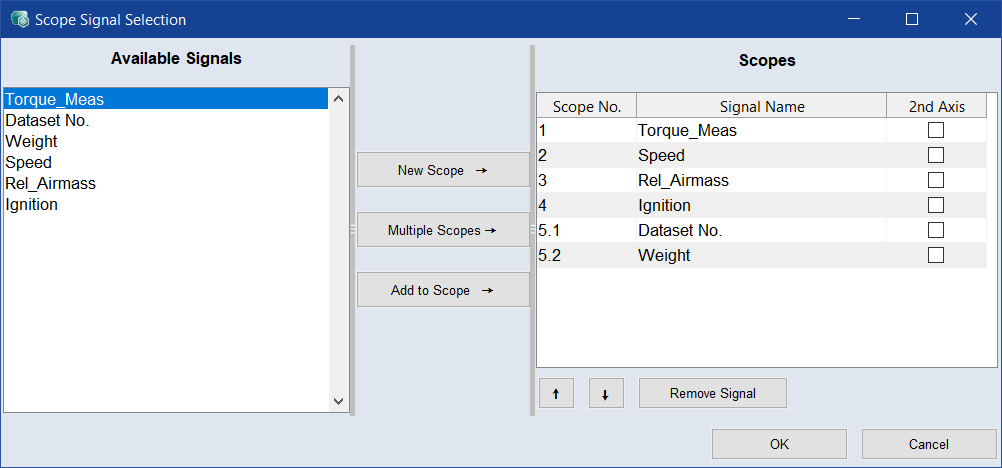
ClosedAvailable Signals

    This list shows all variables that can be plotted in the Scope View window.

ClosedButtons

  • New Scope

    Adds all selected variables to one new scope.

  • Multiple Scopes

    Creates a new scope for each selected variable.

  • Add to Scope

    Adds the selected variables to the scope selected in the Scopes list.

ClosedScopes

  • Scope Table

    Column

    Meaning

    Scope No.

    The number of the scope. The first digit is the number of the scope itself, the second digit is the number of the variable in the scope.

    Scopes with lower numbers appear nearer to the top of the Scope View window. Variables with lower numbers appear nearer to the left in the variables list of their scope.

    Signal Name


    2nd Axis

    By default, all variables in one scope use a common axis that is shown at the left of the scope.

    If you activate an option in this column, the respective variable uses a second axis shown at the right of the scope.

  • /

    Use these buttons to move a selected variable in the list.

  • Remove Signal

    Removes the selected variables from the Scopes list.

OK

Applies your settings and closes the window.

Cancel

Discards your settings and closes the window.

See also

"Scope View" Window