Step 8: Calculated Inputs
This step allows to add and specify additional inputs calculated from formulas.
The calculated inputs can be seen in all visualizations, e.g. scatter plot, scope view, table view. They are also included in the exported experiment plan.
You can use calculated inputs as sorting rules. See, Step 5: Sorting Rules
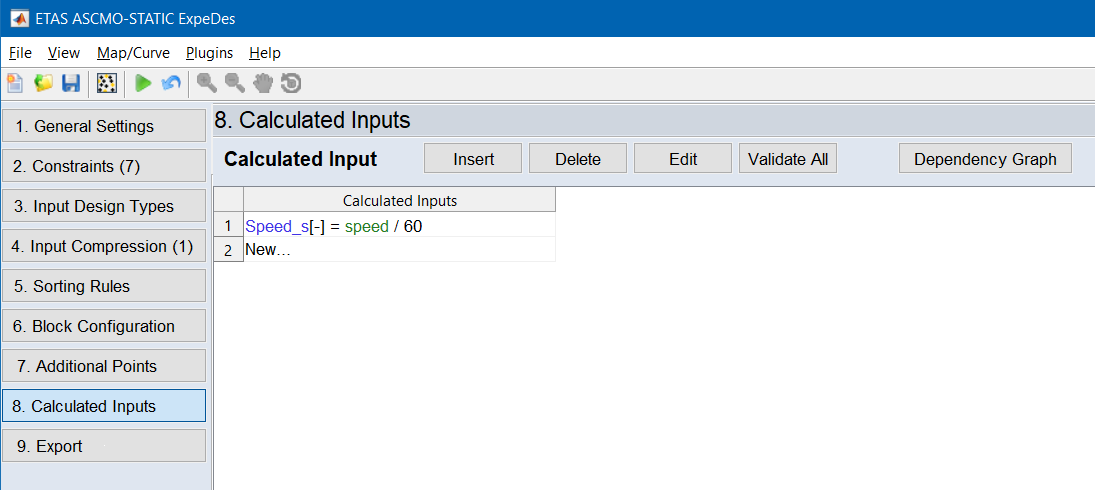
 Insert
Creates a new Calculated Input and opens the "Add Calculated Input" window. The Calculated Input is inserted before the selected row.
Delete
Deletes the selected Calculated Input(s).
Edit
Opens the "Edit Calculated Input" window where you can edit the selected Calculated Input.
|
Note |
|---|
|
You can also double-click to edit a Calculated Input. |
Validate All
Checks the validity of all Calculated Input(s).
Dependency Graph
Opens the "Dependency Graph for Calculated Inputs" window where you can see the graphical representation of the Calculated Input(s) and analyze dependencies.
|
Note |
|---|
|
Syntax Highlighting with different colors for Node, Input or Parameter (see Legend). |
Edit Mode option
If the Edit Mode option is activated, you can change the elements of the function directly in the Calculated Inputs table. The names of inputs, outputs and parameters are marked with %.