Step 4: Input Compression
In this step, compressions of measuring points in certain areas of the measuring space can be specified for inputs by area.
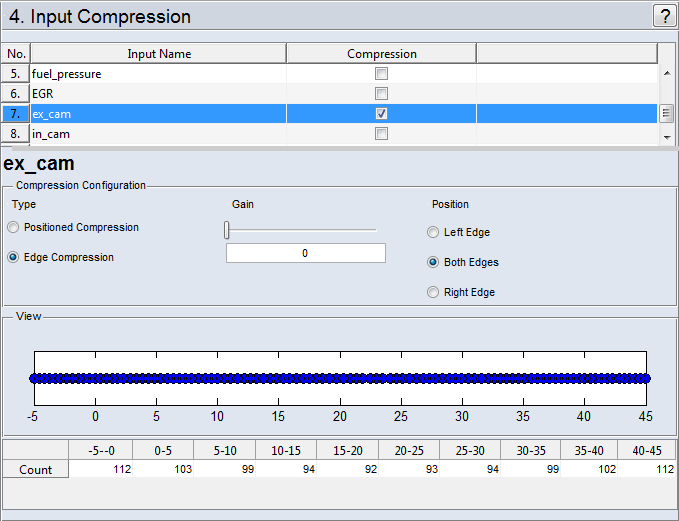
The inputs for which compressions should be performed can be selected in the list ("Compression" column). In the area underneath the input currently selected in the list is displayed.
"Compression Configuration" Area
There are two types ("Type") of compression:
-
In this method, compression focuses on a freely selectable point.
-
Gain
Degree of compression for the selected center ("Position")
-
Position
Position of the center of compression
-
-
This allows obtaining a compression to one or both edges of the measurement range.
-
Gain
Degree of compression
-
Position
The compression is done for one edge (Left Edge, Right Edge) or both edges (Both Edges) of the area.
-
"View" Area
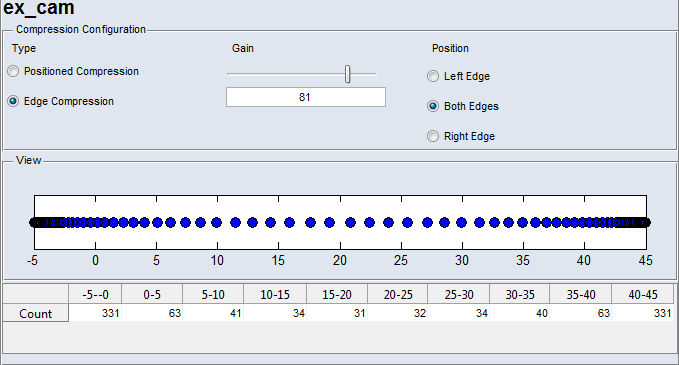
In this area, the position of the measurement points and, therefore, the measure of the selected compression is graphically displayed. Underneath it, the number of measurements in the respective interval resulting from the compression is specified under "No. of Values".
Example:
In the figure below, the measurements of the swirl control valve (SCV) were compressed with a gain of 81 to both edges of the measurement range.