Step 1: General Settings
If a new project is created (e.g., via File → New in the ASCMO-STATIC ExpeDes main window), the general settings are assigned default values. They can and must be extended and changed accordingly at the beginning of the project.
This applies not only to the number of measurements, but also the number and configuration of inputs.
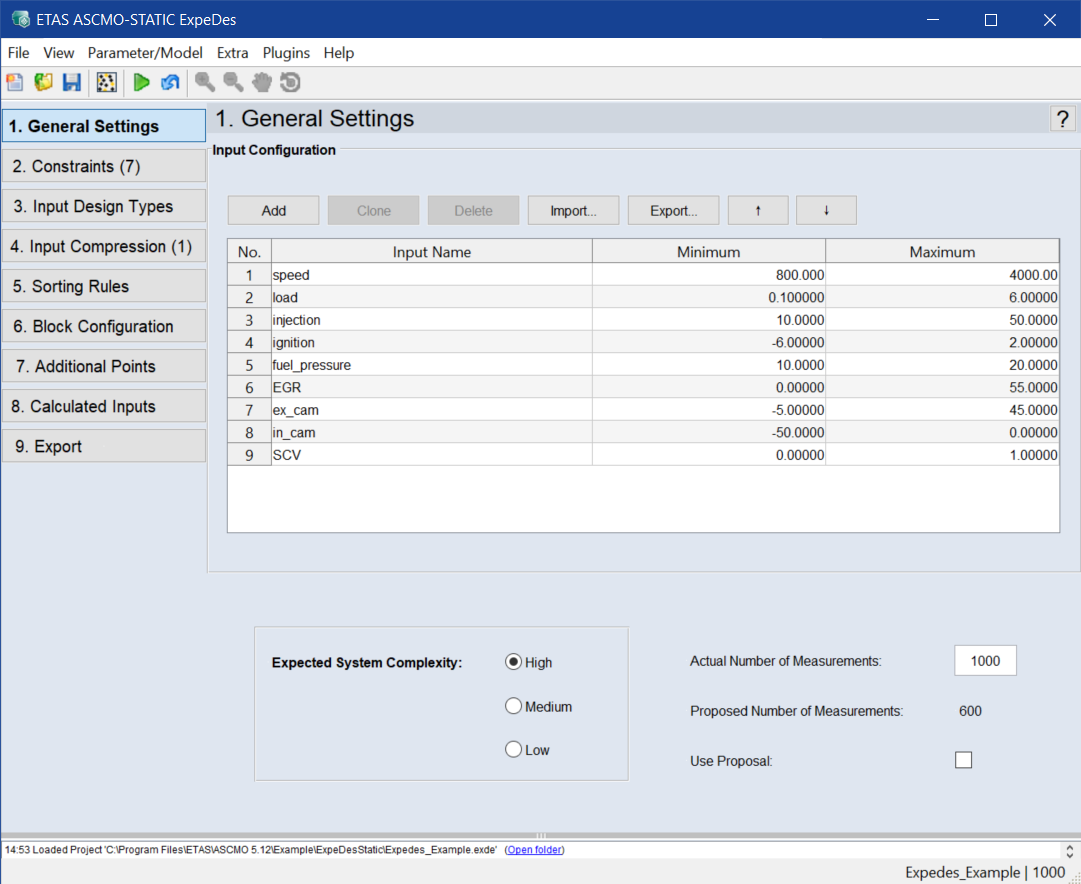
Input Configuration
When creating a new project, five inputs are created which must subsequently be named and configured.
Define a new input
Click on Add to define a new input.
A new input is added to the end of the list. You can also select one or more rows (by clicking on the row number) and duplicate this row with Clone.
Remove an input
To remove an input, select the corresponding row and click on Delete.
Import names of inputs
See Saving and Loading a Configuration, step 2.
Configure an input
To configure the input, specify the following parameters:
-
Input Name
The name of the input quantity to be measured
-
Minimum/Maximum
Lower/upper limit of the measurement range for the respective input
Measurement Size Configuration
The number of points to be measured in the course of the experiment. A distribution of this overall quantity to several blocks can be performed in the "Block Configuration" step.
By selecting the expected system complexity, a number is suggested ("Proposed Number of Measurements") that is accepted when the Use Proposal option is activated.
Expected System Complexity
-
Low
For systems with approximately linear dependencies between inputs and outputs.
-
Medium
For systems whose behavior approximately corresponds to a polynomial of second or third degree (such as a local operating point of an engine, for example).
-
High
For complex systems which can no longer be represented using polynomials (such as an engine over an extended operating range, for example).
Regardless of this, you can also specify the "Actual Number of Measurements" manually.