ASCMO Data Import (ASCMO-DYNAMIC)
ASCMO-DYNAMIC start window > New > Import Dynamic Data
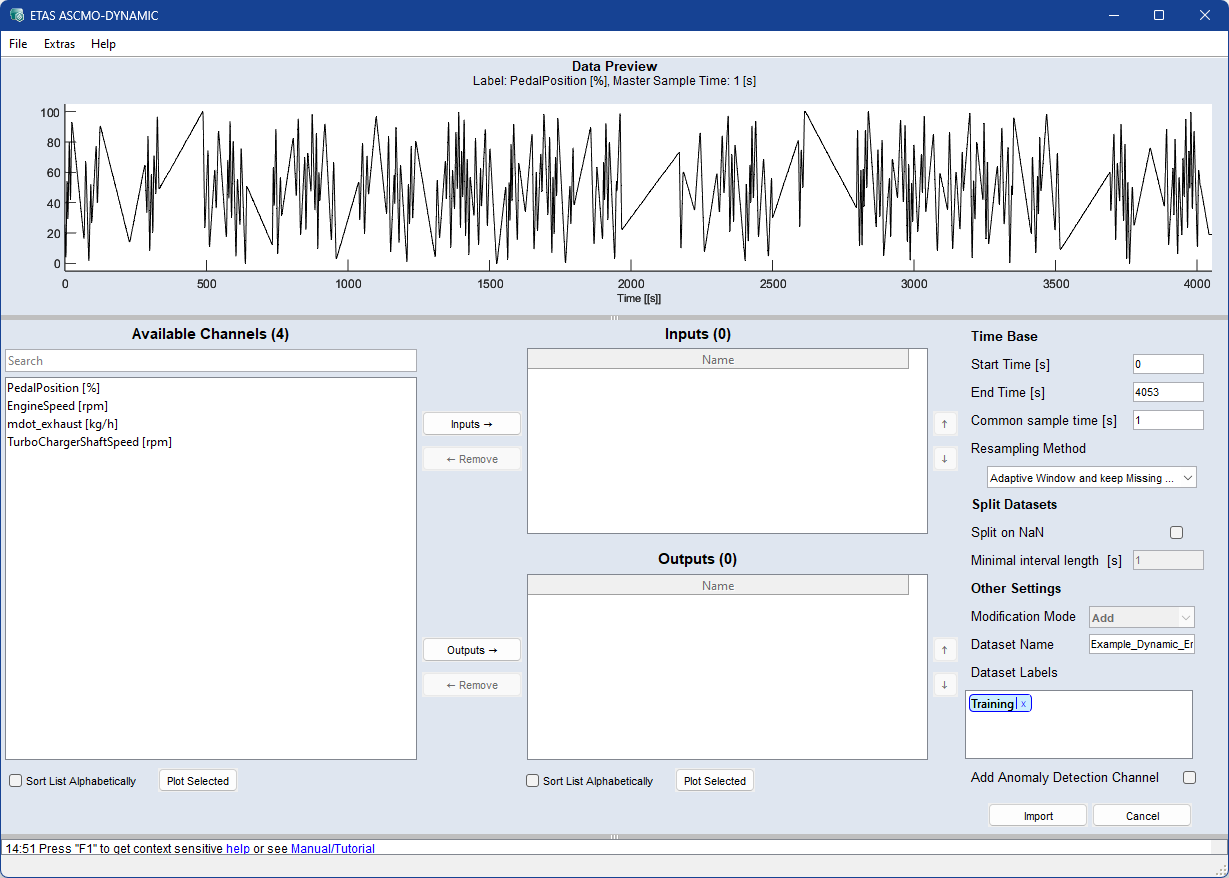
The ASCMO Data Import window contains the following elements:
 File
FileData Preview
Shows a plot of the selected channel of the selected import file over time..
Format Configuration (data-dependent)
This area is visible only if the File > Format Configuration menu option is marked. It can be used to provide and store information on the table to be imported.
-
drop-down list
Select a format configuration.
-
 New/Rename
Creates a new format configuration or renames a selected existing configuration.
-
Delete
Deletes the currently selected format configuration.
-
Use as default checkbox
-
Header row field: Number of the row that contains the column headers, i.e. the channel names.
-
Unit row field: Number of the row that contains the channel units.
-
First data row field: Number of the first row that contains channel data.
Available Channels
This area contains the following elements:
-
a search field
Case-insensitive search pattern with wildcards:
-
* matches any character
-
^ matches the beginning of the name
-
$ matches the end of the name
-
-
a list of all channels that can be imported
-
Sort List Alphabetically checkbox
-
Plot Selected
Opens a plot for the selected channels. See also Displaying the Measurement Data.
Adds selected data channels from Available Channels to
|
Note |
|---|
|
You can also use <Ctrl+I> |
Remove f
Removes selected data channels from
|
Note |
|---|
|
You can also use <Ctrl+R> or double-click an |
Inputs
-
A list of all input channels selected for import. Use the
 and
and  buttons to sort the list.
Outputs
-
A list of all output channels selected for import. Use the
and buttons to sort the list. - Sort List Alphabetically option (for Inputs and Outputs)
-
Plot Selected
Plots the selected Inputs/Outputs.
Time Base (data-dependent)
If not all data should be used, you can restrict the import to a time section.
-
Start Time [s]: begin of the time interval to be imported (in seconds).
-
End Time [s]: end of the time interval to be imported (in seconds).
-
Common sample Time [s]: enter resampling time (step width) for all selected channels.
-
Fixed Step Width [s]: step width in seconds to which all selected channels will be resampled.
-
Multirate, Base [s] (TSiM plugins only): supports multiple and asynchronous rasters. Imported channels are passed directly to TSiM plugins by default.
-
Resampling Method: defines the method for transforming data at given time points to a uniform time basis.
-
Linear Interpolation — linear interpolation between two points.
-
Adaptive Window — resamples using an adaptive window size.
-
Adaptive Window and keep Missing Data — like Adaptive Window but preserves missing data as NaN.
-
Zero-order Hold — preserves discrete values; recommended for discrete signals.
Note
Integer signals from MDF are always resampled with zero-order hold.
-
Split Datasets (data-dependend)
-
Split on NaN: To split the dataset on NaN values into multiple datasets, activate the checkbox.
-
Minimal interval length [s]: Splitted datasets that are shorter than the inserted value are skipped.
Other Settings (data-dependent)
-
Modification Mode
-
Add: data is added to the current data.
-
Replace: current data is replaced by the imported data.
-
-
Dataset Name
You can edit the dataset name using the input field.
-
Dataset Labels
Assign labels to your dataset. The Training label is set by default.
To create a new label, click in the field and type a name. Press Enter to confirm the name and create the label. Use the x next to a label name to delete the label.
You can edit the labels later in the Manage Datasets window.
-
Add Anomaly Detection Channel to outputs checkbox. Import data without an output channel or add an anomaly detection channel to your project(see Add Output for Anomaly Detection and Model Configurations: Anomaly Detection (PCA)).
Import
Starts the import and closes the window.
Cancel
Discards your settings and closes the window.
See also
Assigning Inputs and Outputs (ASCMO-DYNAMIC)
Displaying the Measured Dynamic Data
Checking the Relevance of the Inputs (ASCMO-DYNAMIC)