Output Properties for <output>
Select Gear Symbol next to the Output 
The Output Properties for <output name> window contains the following elements:
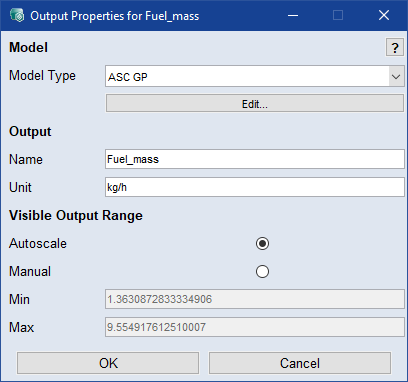
Model Type
Select the model type, you want to use. (see Model Types of ASCMO-STATIC)
Output
-
Name: Enter name for output.
-
Unit: Enter unit for output.
Visible Output Range
-
Autoscale/Manual: Select visible output range.
-
Min/Max: Enter values for shown output range (manual).
-
If Visible Output Range is set manually, the gear symbol of the Output gets blue.

 OK
OK
Applies your settings and closes the window.
Cancel
Discards your settings and closes the window.