Calculation Rules for Cycle-Based Prognosis
To obtain a cycle value from the stationary measure values, you may well have to make some conversions (e.g. time-based measuring to route-based prognosis). This chapter describes how to define Prognosis Calculation Rules (accessed via Calibration > Prognosis > Calculation Rules in the ISP view) using a driving cycle.
|
Note |
|---|
|
The Calibration menu is only available, if operating point axes have been selected during data import (see Assign Inputs and Outputs). You can set the operating point axes afterwards in the menu In/Outputs > Set Operating Point Axes. |
Defining the conversion of units
-
Select Calibration > Prognosis > Calculation Rules.
The Calculation Rules for Prognosis window opens. The window elements are described in the ASCMO-STATIC online help <F1>.
- In the Calculation Rules for Prognosis window, select the Driving Cycle Based tab.
-
In the Output column, select all four existing outputs Fuel_mass, CoV, Soot and NOx_rel in succession.
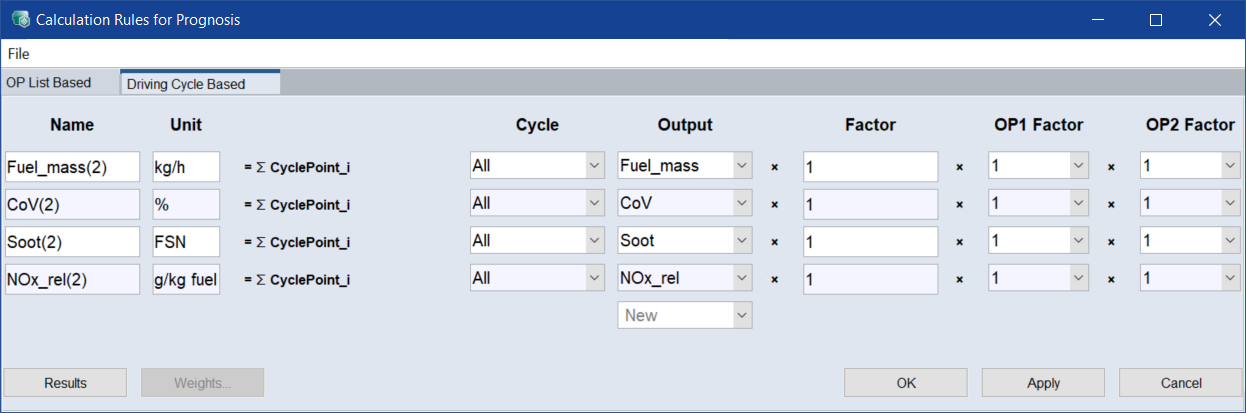
-
Click Apply.
-
An information message appears in the log window that you have changed the prognosis parameters.
Importing the conversion of units
To import a calculation rule for the cycle forecast, proceed as follows.
-
In the Calculation Rules for Prognosis window, select File > Import Settings (*.ini) > Template.
The Load Prognosis Calculation Rule from ini window opens.
-
Select the *. ini file that contains the corresponding calculation rules and click Open.
The Load Prognosis Calculation Rules window opens.
- Assign the template-based calculation rules you want to use to suitable outputs.
-
If desired, activate the Clear All Before checkbox.
Note
If Clear All Before is activated, all existing calculation rules are deleted during import.
If Clear All Before is deactivated, the new calculation rules are added to the existing rules.
-
Click Apply.
-
In the log window, an information that you have changed the calculation rules appears.