Step 7: Additional Points
In this step, additional points (also called repetition points because they are repeatedly measured) can be defined which, in addition to the points of the experiment plan, will be approached repeatedly according to specific criteria and measured, if necessary.
Reasons for the definition of repetition points are:
- A specific point is to be measured several times – this can help to determine, for example, drift effects over the duration of measuring.
- A repetition point can be used as a stabilization point during test automation or a measurement always has to be started from a specific operating point (e.g. regeneration of the particle filter before measuring).
A repetition point is specified by its location in space, a unique ID and the type of repetition characteristic.
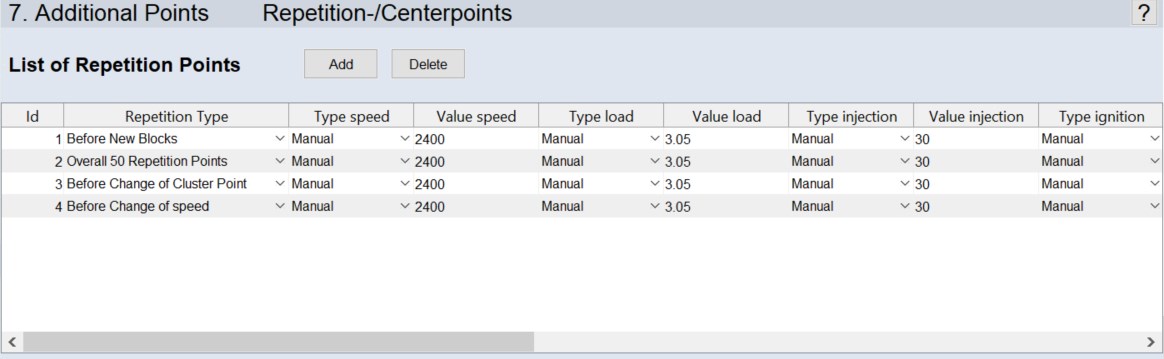
Adding and deleting repetition points
- Click Add to add a new repetition point to the list.
-
In the row of the new repetition point, do the following:
- In the Repetition Type column, select the type for approaching the repetition point.
- In the Type <input> columns, select the type for determining the value of <input>.
- In the <input> columns of the inputs with type Manual, enter the input value.
- To remove a repetition point, select the ID of the point and click Delete.
List of Repetition Points
A repetition point is defined by the following parameters.
-
Id: The unique identifier of the repetition point
-
Repetition Type: The repetition type defines the condition to be met after which the repetition point is approached in each case. See the online help for a description of the possible repetition types.
-
Type <input>: The type of the input is selected here. Available selections are Manual and the maps and curves available in the ASCMO-STATIC ExpeDes project.
-
Value <input>: The value of <input> at the repetition point is defined here. The field can only be edited if the input uses the Manual type.