Step 5: Sorting Rules
In this step, sorting rules can be defined for inputs so that the experiment plan is passed through in a meaningful way (according to the characteristics of the respective system).
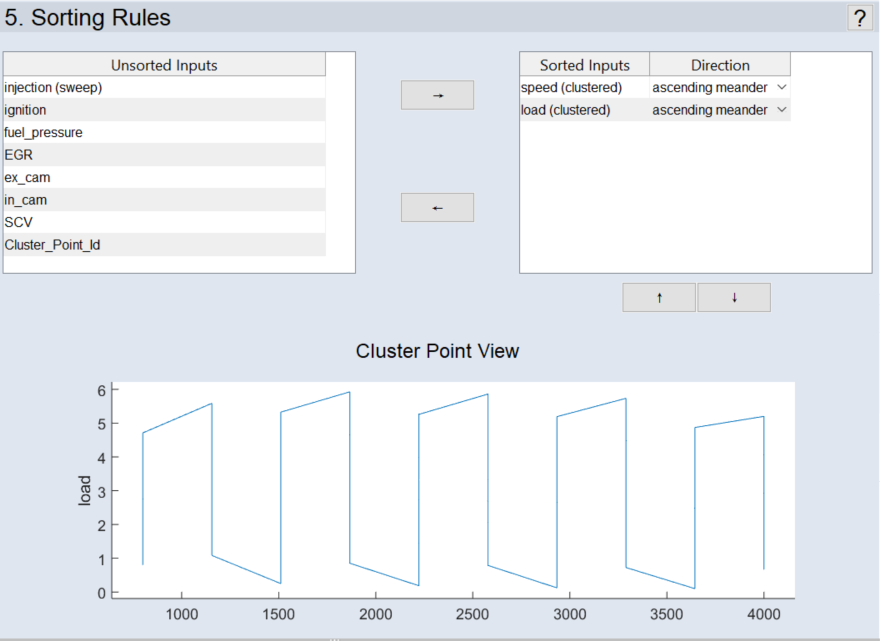
The window consists of two areas. The inputs to be measured can be moved between them with the ® and ¬ arrow buttons ( /
/  ).
).
Unsorted Inputs Area
All unsorted inputs are listed here.
Sorted Inputs Area
All sorted inputs are listed here.
-
Direction: The direction through which this input should pass: Ascending, Descending, or Alternating start low/middle/high.
-
Meander: If this option is activated, the second sorted value does not lead to a reset after the first sorted value has been processed (ascending sorting); instead, the value is retained and processed backwards.
In the screenshot above, no reset takes place to minimum load after measuring the highest load and changing to a higher rotational speed; instead, the load value is retained and the loads (at this rotational speed) are processed in descending order.
Note
The term Meander is not meaningful for the first entry in the list of sorted inputs in each case.
The hierarchy within the list of sorted inputs can be modified using the ↑ and ¯ arrow buttons ( /
/  ).
).
Cluster Point View Area
The behavior of the measurement configured above is displayed graphically.
|
Note |
|---|
|
This area is only displayed if clustered inputs was selected for the sorted values. |