Parameter Range Automated Machine Learning (ASCMO-STATIC)
Model menu > Automated Machine Learning > Parameter Range button
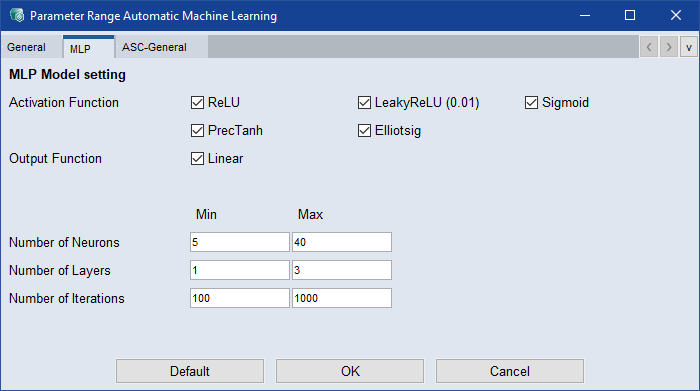
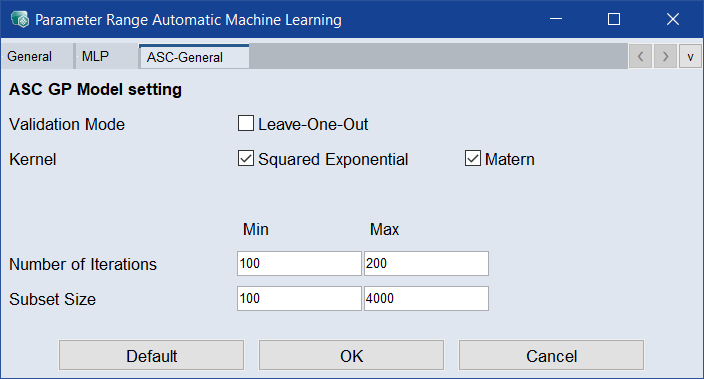
EIn the Automated Machine Learning window you can specify the settings for the automated machine learning and the range of hyperparameters. In the Parameter Range Automated Machine Learning window there are separate tabs for the
The Parameter Range Automated Machine Learning window contains the following elements:
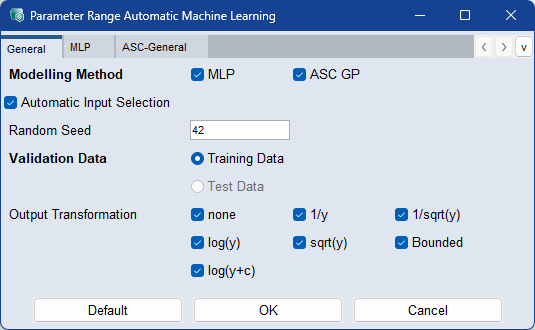
Modeling Method
Activate the checkboxes for the modeling methods you want to use for automated machine learning.
Automatic Input Selection
Automatically learn to base the model on only the important inputs, as a trade-off between model quality and complexity. The global settings are taken into account and each model input list is a subset of the globally activated inputs.
This option is ignored if only one global input is selected.
Random Seed
Enter a seed value for the random number generator to ensure reproducible results.
Choose whether the selection of the best model (RMSE) is based on the training or test data, if available.
Output Transformation
Select the transformation type of the output. Using a transformation can improve the model prediction. Not all transformations are available if the training data has negative or zero values.
You can select from the following choices:
- none: no transformation
- 1/y: inversion
- 1/sqrt(y): inverted square root
- log(y): logarithm
- sqrt(y): square root
-
Bounded: limited to lower and upper bound
-
log(y+c): logarithm plus constant

 Default
Sets all parameters to their default values.
OK
Applies your settings and closes the window.
Cancel
Discards your settings and closes the window.
See also
Automated Machine Learning window