Export to Bosch AMU
Only NARX models with Gaussian process models with squared exponential kernel and logarithmic (or no) transformation are supported by the AMU, e.g., ASC GP, ASC GP-SCS, ASC Compressed.
Export a model to Bosch AMU
-
File > Export Model > Bosch AMU.
-
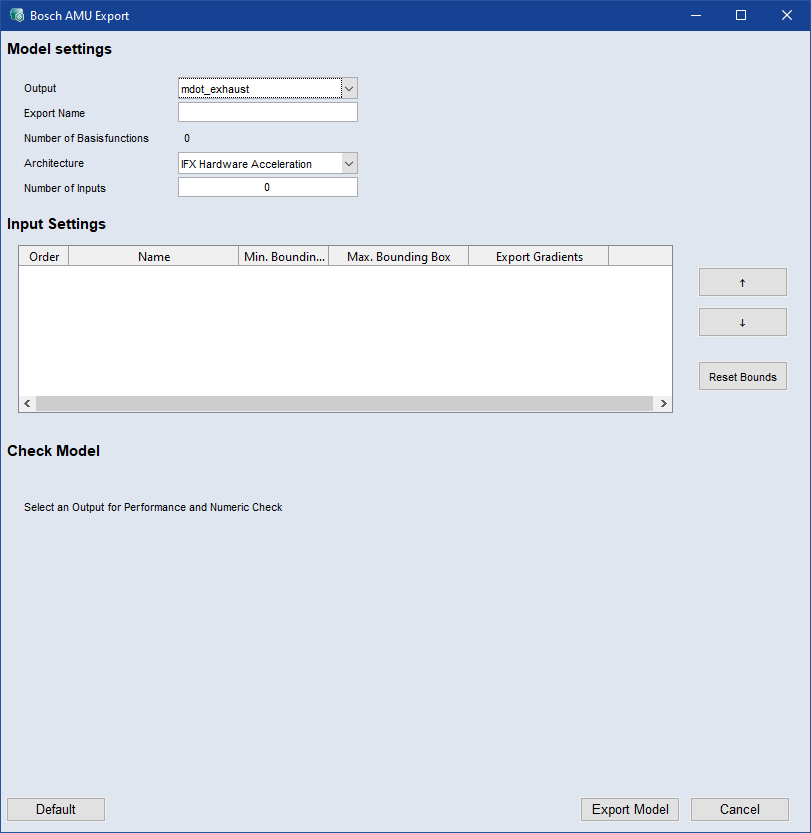
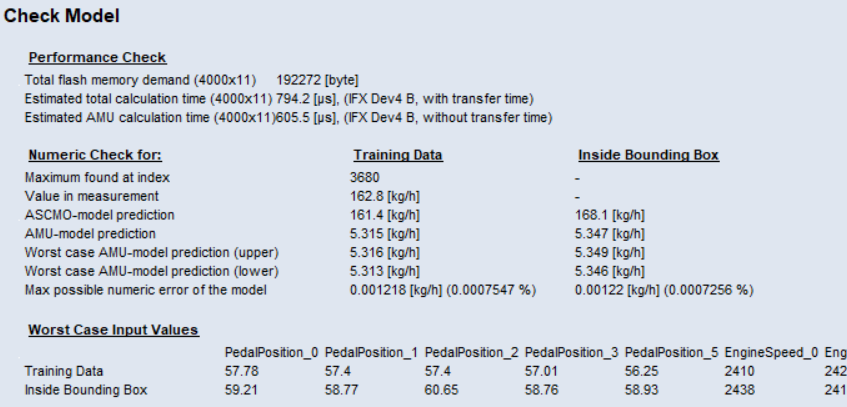
Select an output from the Output drop-down list to perform a performance check and a numerical check.
The results are displayed in the
 Check Model area.
 -
Set the file name in the Export Name input field.
-
Select a microcontroller Architecture from the drop-down list.
DFA (Bosch Data Flow Architecture) compatibility is displayed next to the drop-down list. DAF is not supported when gradient export is selected.
IFX Hardware Acceleration
JDP Hardware Acceleration
IFX Pure Software Calculation
JDP Pure Software Calculation
-
In the Input Settings tabel, you can set the Min. and Max. Bounding Box and whether to Export the Gradient of an input.
-
Click
 Reset Bounds to reset all bounding boxes values.
 -
The order in which the inputs are passed to the exported model can be changed using the
 and
and  buttons. You can use the standard Ctrl/Shift selection functions in the table
 -
Click
Export Model to export the model to Bosch AMU (*.dcm,*.cdfx). -
The export starts and the files are saved to the specified path. A link to the export folder is displayed in the log window.