"Model Memory Impact" Window
Dynamic models, such as recurrent neural networks (RNN) or NARX models, use past values for evaluation. During the initial evaluation of a dataset, deviations from the learned values may occur until the model has settled.
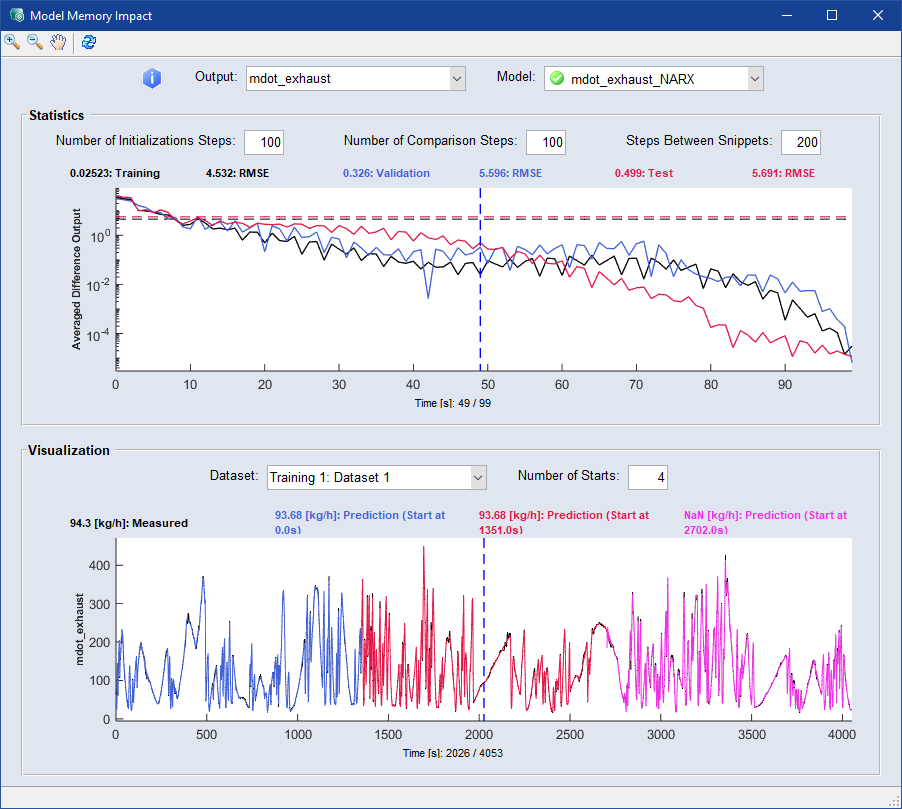
Especially in models with memory, such as a RNN, this transient process can affect the entire model evaluation. The  "Model Memory Impact" window serves as a tool to visualize these influences and facilitate the selection of a stable model. It contains the following elements:
"Output" drop-down
Select an output from the drop-down list. The window refreshes automatically.
"Model" drop-down
Select a model from the drop-down list. The window refreshes automatically.
"Statistics" area
To evaluate the duration of the transient process, the model is evaluated for the different dataset categories. The datasets are divided into parts according to the "Steps Between Snippets". A model evaluation is now performed on each snippet, once at the beginning and once after a certain number of time steps, the "Number of Initializations Steps". The RMSE is now calculated using the comparison length, the "Number of Comparison Steps". The average RMSE over all snippets and data sets is displayed in the graph. This should decrease with the number of comparison steps. For good models, the comparative RMSE should be significantly lower than the total RMSE after a reasonable settling time.
"Number of Initialization Steps" input field
Enter the number of time steps after which you want the second evaluation of the model to be performed. Press Enter/↵ to accept the entry.
"Number of Comparison Steps" input field
Enter a number as the comparison length based on which the RMSE is calculated. Press Enter/↵ to accept the entry.
"Steps Between Snippets" input field
Enter the number of steps you want between each snippet. Press Enter/↵ to accept the entry.
"Visualization" area
This graph shows the evaluation of the selected model at various points in a dataset. The "Number of Starts" indicates how often the model evaluation is triggered. The specific transient behavior can be observed here. For good models, the evaluations converge after a reasonable settling time.
"Dataset" drop-down
Select a dataset from the drop-down list to visualize in the graph.
"Number of Starts" input field
Enter the number of times you want the model evaluation to start. Press Enter/↵ to accept the entry.