Data Menu
The Data menu consists of the following entries:
Manage Datasets
Opens the Manage Datasets.
Opens the  Active Datasets window where you can select which datasets to activate. Activating/deactivating datasets has a global effect on all steps and dataset selection options in ASCMO-DYNAMIC.
Select/Deselect datasets in the list to activate/deactivate them. The selection updates evaluations throughout ASCMO-DYNAMIC live. You can use the standard Ctrl/Shift selection functions in the table.
Each dataset is assigned an ID number. This numeric identifier remains globally associated with the dataset.
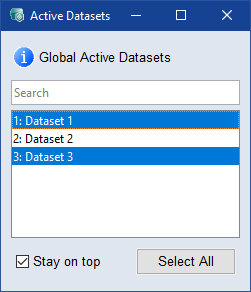
Stay on top
When activated the Active Datasets window always stays on top of other open windows.
 Select All
Selects all datasets from the list.