Parameter Range Automated Machine Learning (ASCMO-STATIC)
Model menu > Automated Machine Learning > Parameter Range button
In the Automated Machine Learning window you can specify the settings for the automated machine learning and the range of hyperparameters. In the Parameter Range Automated Machine Learning window there are separate tabs for the
The Parameter Range Automated Machine Learning window contains the following elements:
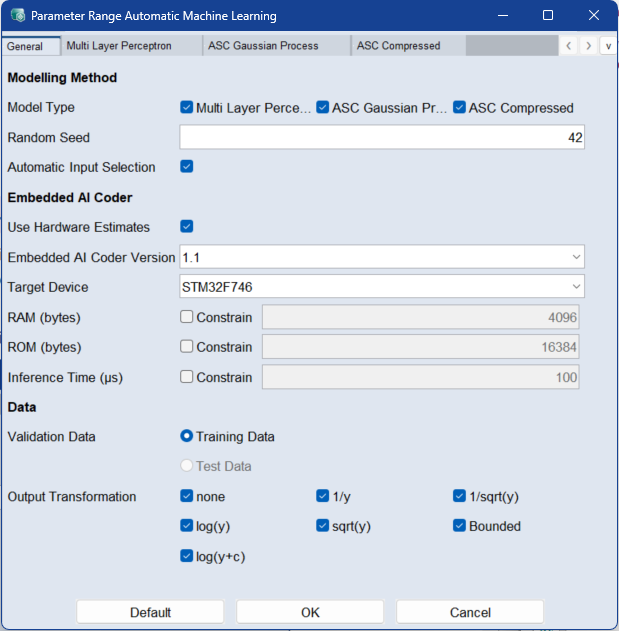
 General
Modeling Method
Model Type
Activate the checkboxes for the models you want to use for automated machine learning.
Random Seed
Enter a numeric value to initialize the random number generator.
Setting a fixed seed ensures reproducible training and validation results.
Automatic Input Selection
When enabled, the algorithm automatically selects only the most relevant input features. This helps balance model accuracy and complexity. The selection is based on the globally activated inputs, and each model uses a subset of them.
This option is ignored if only one global input is selected.
Embedded AI Coder
Use Embedded AI Coder options to make your AutoML process hardware-aware — ensuring models are optimized for real device constraints like processing power, memory, and inference time.
Hardware-aware model training designs models that fit the capabilities and limits of your target device for efficient deployment.
This requires a valid Embedded AI Coder installation.
Use Hardware Estimates
When enabled, the system estimates model resource requirements (e.g., RAM, ROM, inference time) based on hardware specifications provided by the selected Target Device.
-
Embedded AI Coder Version:Specifies the version of the Embedded AI Coder used for hardware estimates.
-
Target Device: Select a supported hardware device. The list of available devices depends on the selected Embedded AI Coder Version.
-
RAM (bytes): Defines the maximum available Random Access Memory (RAM) in bytes. Models estimated by Embedded AI Coder to exceed this RAM limit, based on the selected hardware specifications, are automatically skipped. Use the Constrain checkbox to activate the option.
-
ROM (bytes): Defines the maximum available Read-Only Memory (ROM) in bytes. Models estimated by Embedded AI Coder to exceed this ROM limit, based on the selected hardware specifications, are automatically skipped. Use the Constrain checkbox to activate the option.
-
Inference Time (µs): Specifies the estimated model inference time per evaluation step, in microseconds. This value serves as an approximate estimate. Models exceeding the defined limit are omitted, but allowing some tolerance is recommended since estimates may vary. Use the Constrain checkbox to activate the option.
Data
Model Setting: Multi Layer Perceptron
-
Activation Function : Activate the corresponding activation functions for the hidden layers.
-
Number of Neurons : Enter the range of neurons per layer.
-
Number of Layers: Enter the range of hidden layers.
-
Number of Iterations: Enter the range of iterations.
Activate the
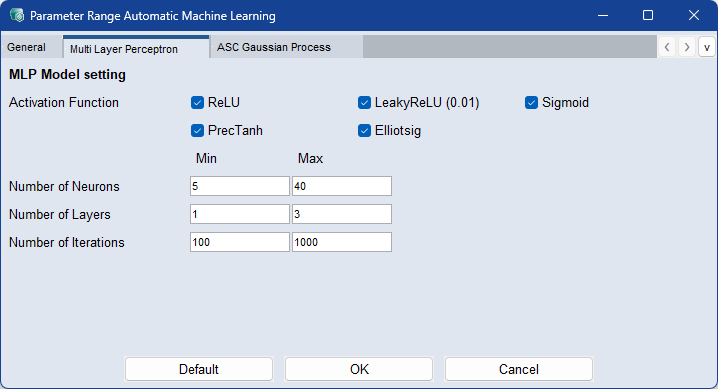
Activate the checkboxes of the elements to be used during the machine learning process:
Enter the range of minimum and maximum values for the continuous parameters to be used during the automated machine learning process:
Model Setting: ASC Gaussian Process
-
Validation Mode: Activate the checkbox if you want Leave-One-Out error on training data to be used to calculate the RMSE. If activated, the Validation Data setting in the General tab is ignored.
-
Layer Type: Activate the checkboxes of the kernels to be used for modeling.
-
Use Linear Extrapolation: Activate True if you want to enable linear extrapolation mode. Linear extrapolation adds a supplementary linear function to the Gaussian Process model. Activate False if you do not want to use linear extrapolation.
-
Number of Iterations: Enter the range of iterations.
-
Number of Basis Functions: Enter the range of the number of basic functions for the model training.
Activate the
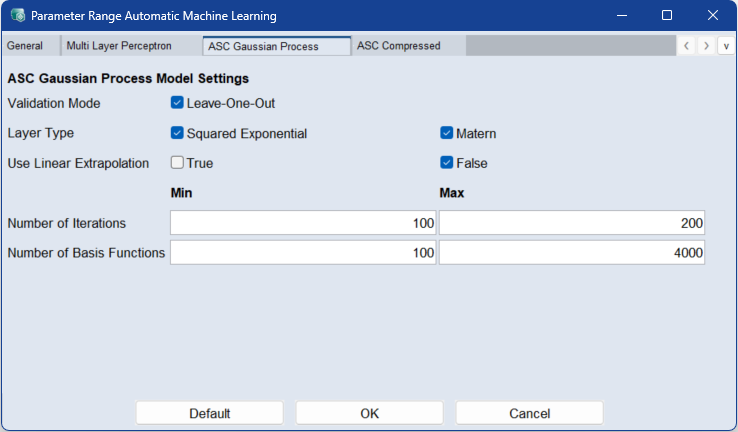
Activate the checkboxes of the elements to be used during the machine learning process:
Enter the range of minimum and maximum values for the continuous parameters to be used during the automated machine learning process:
Model Setting: ASC Compressed
Activate the
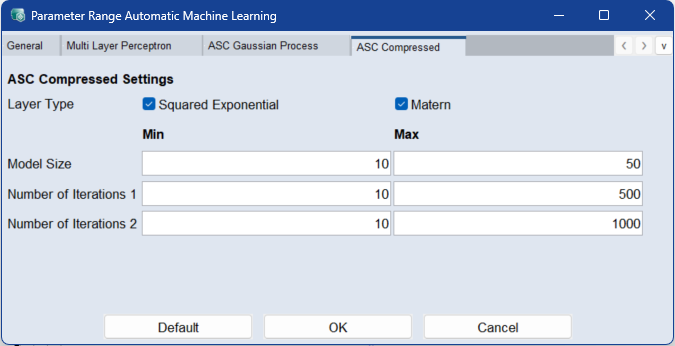
Activate the checkboxes of the elements to be used during the machine learning process:
-
Layer Type: Activate the checkboxes of the corresponding kernels for the model.
Enter the range of minimum and maximum values for the continuous parameters to be used during the automated machine learning process:
-
Model Size: Enter the range for the number of basis functions of the compressed model.
-
Number of Iterations 1: Enter the range for the number of iterations for the first stage of the model training.
-
Number of Iterations 2: Enter the range for the number of iterations for the second stage of the model training.
 Default
Sets all parameters to their default values.
OK
Applies your settings and closes the window.
Cancel
Discards your settings and closes the window.
See also
Automated Machine Learning window