Open Model Monitoring Project
Model > Model Monitoring
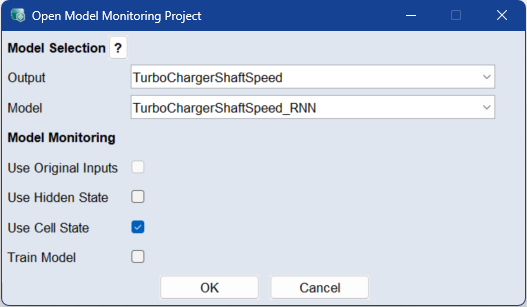
Use this window to create a Model Monitoring project for a supported trained model. Model Monitoring checks whether the current input data and the selected internal model states are within the distribution of the training data.
The trained anomaly detection model can be exported to Embedded AI Coder together with the output models. In Embedded AI Coder, the code for the anomaly detection model and the selected output models can be generated for execution on the electronic control unit, see Model Export to Embedded AI Coder.
Currently, only Recurrent Neural Network (RNN) models are supported.
Model Selection
Output
Select the output you want to monitor.
The list contains all available outputs that have at least one non-outdated model supported by Model Monitoring.
Model
Select the model for the selected output.
The list contains the supported models for the selected output.
The selected model must be trained and must not be outdated.
Model Monitoring
Use Original Inputs
Activate this checkbox to use the original inputs of the monitored model as inputs for Model Monitoring.
Activate at least one of the following checkboxes: Use Original Inputs, Use Hidden State, or Use Cell State. Otherwise, the Model Monitoring model has no input data for training.
Use Hidden State
Activate this checkbox to use the hidden states of the monitored model as inputs for Model Monitoring.
The hidden states represent internal model states. They are used by Model Monitoring to evaluate whether the current model state is consistent with the learned data distribution.
If the selected RNN cell type has only one state, it is recommended to activate this option to capture the model dynamics.
The n-th time step represents the hidden state after evaluating the n-th input of the model.
Activate at least one of the following checkboxes: Use Original Inputs, Use Hidden State, or Use Cell State. Otherwise, the Model Monitoring model has no input data for training.
Use Cell State
Activate this checkbox to use the cell states of the monitored model as inputs for Model Monitoring.
The cell states represent internal model states. They are used by Model Monitoring to evaluate whether the current model state is consistent with the learned data distribution.
If active, Model Monitoring incorporates the cell states of the monitored model as inputs.
It is recommended to activate at least one of the options Use Hidden State or Use Cell State in order to capture the dynamics of the model.
The n-th time step represents the cell state after evaluating the n-th input of the model.
Activate at least one of the following checkboxes: Use Original Inputs, Use Hidden State, or Use Cell State. Otherwise, the Model Monitoring model has no input data for training.
Train Model
Activate this checkbox to automatically start Model Monitoring training with the default settings for the Gaussian Mixture Model.
If this checkbox is not activated, the Model Monitoring project is created without starting the training automatically. You can start the training later manually.
See also