"Create/Edit Parameter" Window
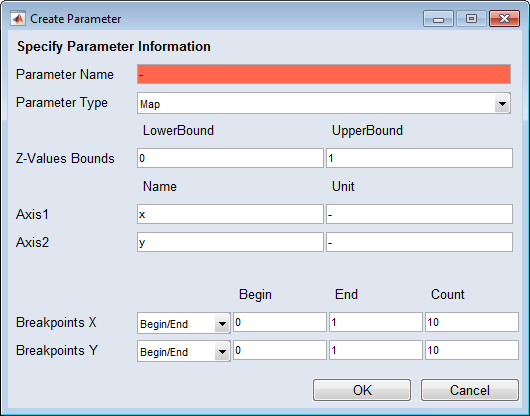
The look of the  "Create Parameter" and "Edit Parameter" windows depends on the parameter type. The window elements can be grouped in the following categories:
- available for all parameters
- available for parameters of type curve, map, Cube-3D, Cube-4D
All Parameters
"Parameter Name" field
Enter a name for the parameter. If no valid name is given, the field is red.
"Parameter Type" combo box
This combo box offers the available parameter types (Map, Curve, Scalar, Cube-3D, Cube-4D) for selection.
"Z-Value Bounds" fields
Used to define lower and upper bound of the value.
 OK
OK
Applies your settings and closes the window.
Cancel
Discards your settings and closes the window.
Parameters of Type Curve, Map, Cube-3D and Cube-4D
"Axis<i>" fields
|
Note |
|---|
|
<i> can be 1 (curve, map, Cube-3D, Cube-4D), 2 (map, Cube-3D, Cube-4D), 3 (Cube-3D, Cube-4D), 4 (Cube-4D). |
Used to define name and unit of the <i> axis.
"Breakpoints <a>" rows
|
Note |
|---|
|
<a> can be X (curve, map, Cube-3D, Cube-4D), Y (map, Cube-3D, Cube-4D), Z1 (Cube-3D, Cube-4D), Z2 (Cube-4D). |
-
combo box
Determines the specification mode for the axis points.
Begin/End
"Begin" and "End" fields are used to specify lower and upper bound of the axis.
The axis points are evenly distributed.
Support Vector
"Begin" and "End" fields are combined. The axis points are specified as a vector, e.g., [13.14 31.44 49.73 68.03 86.33 ].
This mode can be used to specify unevenly distributed axis points. If you add or delete an axis point, the value in the "Count" field is updated.
-
"Begin" and "End" fields
Used to specify the axis points. The look of the fields depends on the selection in the combo box.
-
"Count" field
Determines the number of axis points. If you change the value while Support Vector is selected in the combo box, a new vector with the new number of equidistant axis points is created.
See also