ASCMO Data Import (ASCMO-DYNAMIC)
ASCMO-MOCA start window > New > Import Dynamic Data
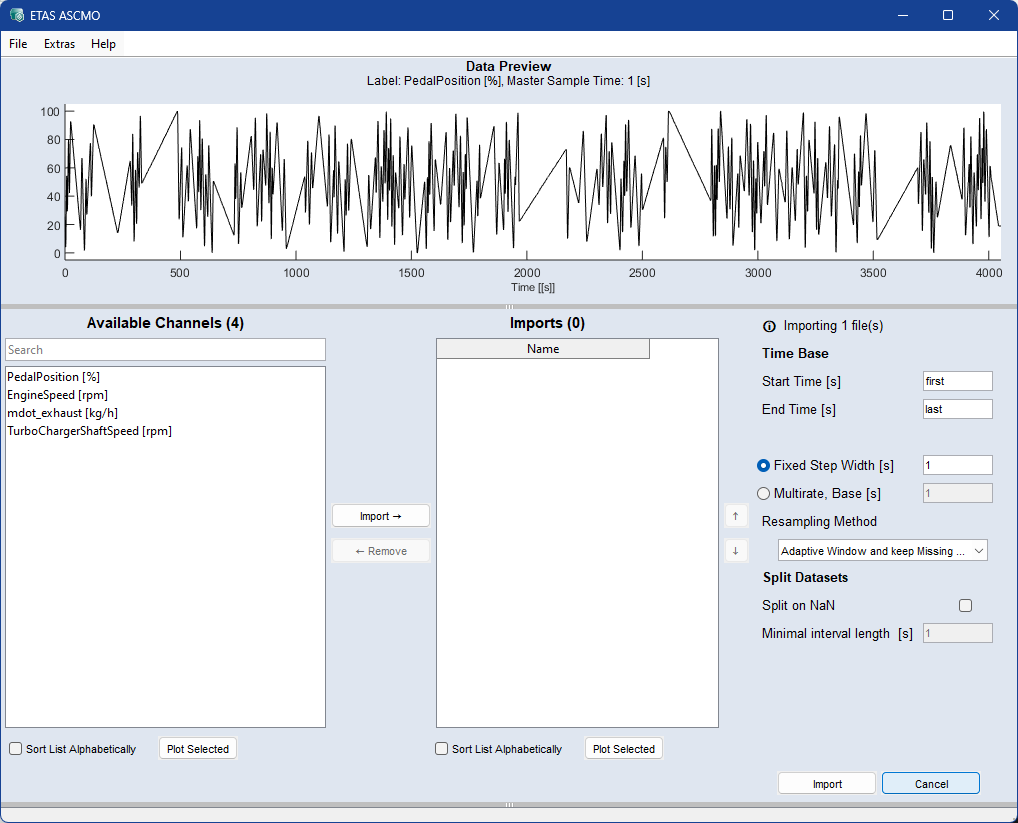
The ASCMO Data Import window contains the following elements:
 File
FileData Preview
Shows a plot of the selected channel of the selected import file over time..
Format Configuration (data-dependent)
Available Channels
This area contains the following elements:
-
a search field
Case-insensitive search pattern with wildcards:
-
* matches any character
-
^ matches the beginning of the name
-
$ matches the end of the name
-
-
a list of all channels that can be imported
-
Sort List Alphabetically checkbox
-
 Plot Selected
Opens a plot for the selected channels. See also Displaying the Measurement Data.
Adds selected data channels from Available Channels to Import.
|
Note |
|---|
|
You can also use <Ctrl+I> or double-click a data channel. |
Remove f
Removes selected data channels from Import.
|
Note |
|---|
|
You can also use <Ctrl+R> or double-click an |
Imports
-
Shows all channels selected for import.
Use the
 and
and  buttons to sort the list.
 -
Sort List Alphabetically checkbox
-
Plot Selected
Plots the selected imports.
Time Base (data-dependent)
If not all data should be used, you can restrict the import to a time section.
-
Start Time [s]: begin of the time interval to be imported (in seconds). Use first to refer to the time of the first data point of the selected channels. Example: first+0.1, 3.
-
End Time [s]: end of the time interval to be imported (in seconds). Use last to refer to the time of the last data point of the selected channels. Example: first+0.1, last-20, 100.
-
Common sample Time [s]: enter resampling time (step width) for all selected channels.
-
Fixed Step Width [s]: step width in seconds to which all selected channels will be resampled.
-
Multirate, Base [s] (TSiM plugins only): supports multiple and asynchronous rasters. Imported channels are passed directly to TSiM plugins by default. MOCA visualizes and evaluates the data based on the base sample rate.
-
Resampling Method: defines the method for transforming data at given time points to a uniform time basis.
-
Linear Interpolation — linear interpolation between two points.
-
Adaptive Window — resamples using an adaptive window size.
-
Adaptive Window and keep Missing Data — like Adaptive Window but preserves missing data as NaN.
-
Zero-order Hold — preserves discrete values; recommended for discrete signals.
Note
Integer signals from MDF are always resampled with zero-order hold.
-
Split Datasets (data-dependend)
-
Split on NaN: To split the dataset on NaN values into multiple datasets, activate the checkbox.
-
Minimal interval length [s]: Splitted datasets that are shorter than the inserted value are skipped.
Import
Starts the import and closes the window.
Cancel
Discards your settings and closes the window.
See also
Assigning Inputs and Outputs (ASCMO-DYNAMIC)
Displaying the Measured Dynamic Data
Checking the Relevance of the Inputs (ASCMO-DYNAMIC)