Defining Menu Items
To define menu items, proceed as follows:
Do one of the following:
- Create a new *.ini file
- Open an existing *.ini file.
Enter a name for the section, e.g., [Input].
Make sure that the name is used only once in the file.
Enter the window that contains the menu, e.g.,
WINDOW=databasebrowser.
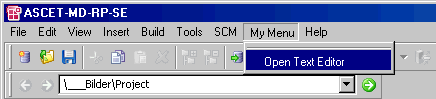
Enter a name for the menu, e.g., MENU=~My Menu.
When you enter a new menu name, a new menu is created. When you enter the name of an existing menu, the menu item is added to the existing menu.
If desired, enter a name for the submenu, e.g., SUBMENU=My ~Submenu.
When you enter a new submenu name, a new submenu is created. When you enter the name of an existing submenu, the menu item is added to the existing submenu.
Enter the name the menu item will have, e.g.
ITEM=~Open Text Editor.
Note
The ~ in menu name, submenu name, and menu item name is used to denote the mnemonic key. You can place the ~ anywhere in the name, but make sure that each mnemonic (including the existing ones) is used only once in a given window.
Enter a description, e.g.
DESCRIPTION=opens external text editor.
Enter where you want a separator, e.g.
SEPARATOR=before.
Enter the script file, e.g.
FILE=openeditor.txt.
The next time ASCET is started, My Menu will be generated in the Component Manager.
See also