SELECTOR
The keyword SELECTOR is used to invoke a range of predefined commands in the Component Manager or the specification editors.
Output of object IDs of selected components
SELECTOR executerFileOutSelectedElementsTo: <filename>
creates a file which contains the object IDs. The required file ending must be specified in <filename>, path specifications are optional.
Note |
|---|
The blank after the colon is mandatory for all predefined commands. The command cannot be executed if the colon is forgotten. If you make path specifications in <filename>, make sure that all subdirectories exist. Otherwise the file cannot be created. |
A menu item is added to the Component Manager which invokes the following script file.
SELECTOR executerFileOutSelectedElementsTo: .\Executer\mysel.txt
EXECUTE C:\Windows\notepad.exe .\Executer\mysel.txt
MENUITEM View>Update
The ControllerTest, WarmUp and Light components are selected and then the menu item is invoked. The following happens:
- The first line (SELECTOR ...) creates the mysel.txt file in the Executer subdirectory of the installation directory.
The second line (EXECUTE ...) opens the newly created file in Notepad.
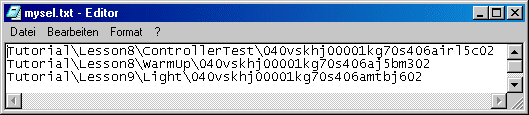
- The third line (MENUITEM ...) updates the Component Manager once Notepad has been closed.
See also