OBJECT
The keyword OBJECT can be used together with a range of identifiers for different commands.
Displays the exe_hlp.txt help file in the specified editor.
EXAMPLEOBJECT help: notepad displays the help in the Notepad editor.
Note
The blank after the colon is mandatory for all identifiers. The command cannot be executed if the colon is forgotten.
Displays the exe_log.txt log file in the specified editor.
EXAMPLEOBJECT log: notepad
Opens a window with a message for the user.
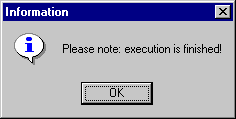
EXAMPLEOBJECT message: Please note: execution is finished! results in the following window:
The ASCET window with the specified name pops up. <title> does not have to be the complete name, part of the name specified in the title bar is sufficient.
EXAMPLEOBJECT popWindow: Database – the Component Manager pops up.
generatePopWindowCommandFile: <filename>
Creates a file with the specified name in which the correct popWindow command is generated for the ASCET window currently active. The required file ending must be specified in <filename>, path specifications are optional.
EXAMPLEOBJECT generatePopWindowCommandFile: pop.txt
generates the pop.txt file with the following contents when invoked from the Component Manager (only ASCET-MD is installed):
OBJECT popWindow: ASCET-MD
Interrupts execution of the script file for n seconds.
EXAMPLEThe lines
OBJECT wait: 5
EXECUTE C:\Windows\notepad.exe
result in a 5-second delay before Notepad is started.
Displays a list (exe_win.txt) of the Smalltalk names of all open ASCET windows in the specified editor.
EXAMPLEOBJECT windows: notepad
displays the list in Notepad.
See also