Specifying Conditions and Transition Actions in the Transition Editor
The transition editor, which is used to specify conditions and transition actions, has the same functionalities as the state editor.
Do one of the following:
- Right-click the transition and select Edit Transition from the context menu.
- Double-click the transition.
The transition editor opens.
On the Condition or Action tab, select <ESDL> from the combo box.
The input field below the combo box is activated.
- Type the ESDL code into the input field.
- Click OK.
The ESDL code of all conditions and actions specified at a state or transition is displayed in the state diagram. For complicated state machines, it can thus quickly become rather crowded.
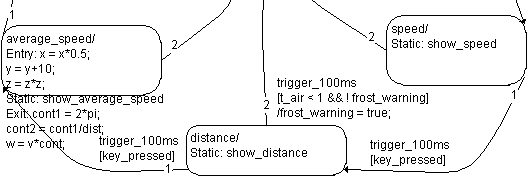
You can avoid that by entering a comment in the first line when you add conditions or actions. One-line comments are marked by two leading slashes //, comments of any length are included in /* <Comment> */. In this case, only the comments are displayed.
You can also add the comment lines automatically at a later time.
See also