Changing the Path of a Transition
Click the transition to display the path and connection handles in the diagram.
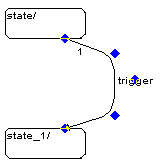
Drag the path handles to change the path of the transition.
Drag the connection handles to change the position of the connection on the state symbol.
You can assign an existing connection to another source or target state simply by dragging the connection handles.