Defining the Start State
Each state machine must have a start state. The state machine is in start state when the class is initially activated.
Do one of the following:
- Right-click the state intended as the start state and select Edit State from the context menu
- Double-click the state symbol.
The State Editor window is opened.
Activate the Start State option.
Click OK.
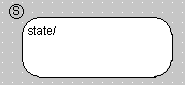
The selected state displays a circled S in the upper left corner to indicate that it is the start state.
See also