Resolving a Hierarchy State
Right-click a hierarchy state.
Select Resolve Hierarchy from the context menu.
All elements and their connections are copied from the hierarchy state to the higher-level drawing area in the same position. This creates a second independent state diagram with a start state. The double lines which highlighted the closed hierarchy state are deleted. If the selected state had a history, this is also deleted.
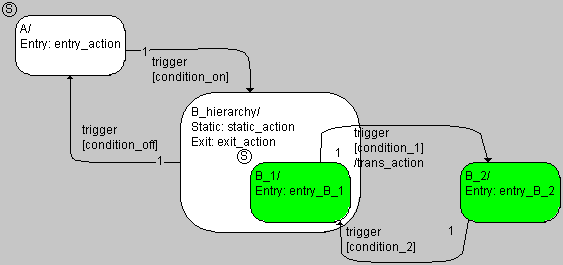
After resolving the hierarchy, the state machine is often unclear, and it (usually) does not have the same functionality as before. In the example, the states B_1 and B_2 were, at the beginning, contained in the close hierarchy state B_hierarchy. Now only B_1 is contained in B_hierarchy. If, therefore, the transition from B_1 to B_2 (or vice-versa) occurs, other actions are also executed (see also Semantics: Hierarchical State Machines).
To create the required functionality and also to make the diagram clearer, post-editing is required.