Context Menu Diagram, Method or Runnable
In the Outline tab, the context menu of a diagram, method or runnable contains a selection of the following functions:
Copy (<Ctrl> + <c>)
Copies a selected method/runnable to the ASCET clipboard.
Paste (<Ctrl> + <v>)
Inserts the method/runnable of the ASCET clipboard.
Delete (<Delete>)
Deletes a selected diagram, method or runnable.
Rename (<F2>)
Renames a selected diagram, method or runnable.
Properties (<Ctrl> + <Shift> + <p>)
Opens the signature editor for a selected method/runnable.
Implementation (<Ctrl> + <Shift> + <i>)
Opens the implementation editor for a selected method/runnable.
Add Diagram
Public | Adds a public diagram. |
Private | Adds a private diagram. |
Create ASCET Link
Creates an ASCET link that opens the component and highlights the selected diagram, method, runnable or method/runnable element in the Outline tab.
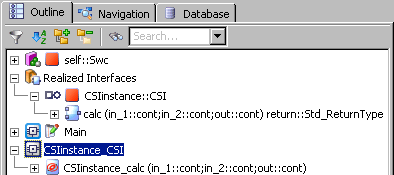
When you use Create ASCET Link
on an operation of a server node below the Realized Interfaces node (see  this example), the generated link opens the ClientServer interface component instead of the SWC.
Load Diagram
Loads a diagram.
Move Up Diagram
Moves a diagram up in the Outline tree.
Move Down Diagram
Moves a diagram down in the Outline tree.
Move Method to or Move Runnable to
Moves a method/runnable from one diagram to another diagram (see also Moving Runnables and Methods between Diagrams).
Default Method or Default Runnable
Marks the selected method or runnable as default method/runnable (see also Selecting a Default Method/Runnable).
Add Method
Adds a method to the selected diagram.
Add Runnable
Adds a runnable to the selected diagram.