Example: Accessing Calibration Parameters
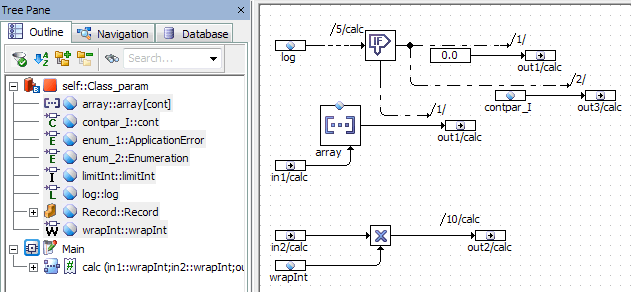
The following class with several imported parameters s added to an SWC.
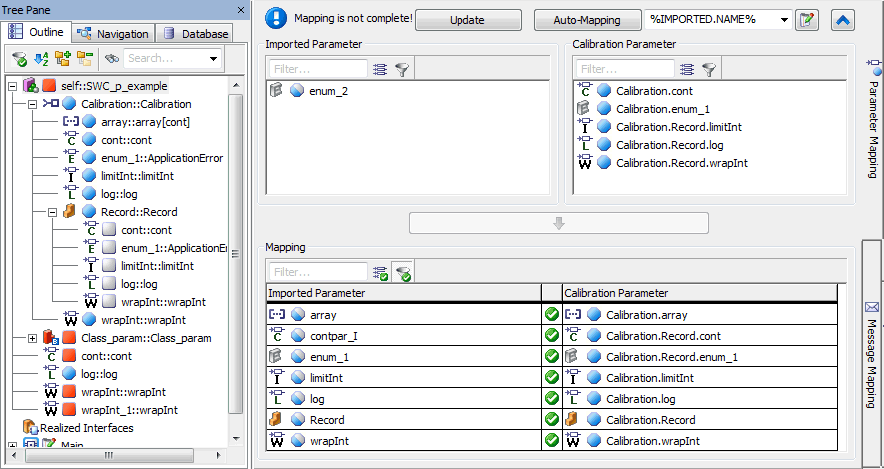
A Calibration interface with several parameters is also added to the SWC. Parameter mapping is performed with the Auto-Mapping button; contpar_I is manually mapped to the record element cont. The result is shown below.
With that mapping, the following C code is generated. Effects of the mapping are set in bold.
FUNC(void, SWC_p_example_CODE) CLASS_PARAM_IMPL_calc (
/* IN */ VAR(uint32, AUTOMATIC) in1,
/* IN */ VAR(uint32, AUTOMATIC) in2,
/* OUT */ CONSTP2VAR(float64, AUTOMATIC, RTE_APPL_DATA) out1,
/* OUT */ CONSTP2VAR(uint32, AUTOMATIC, RTE_APPL_DATA) out2,
/* OUT */ CONSTP2VAR(float64, AUTOMATIC, RTE_APPL_DATA) out3
)
{
/* calc: sequence call #5 */
if (Rte_Prm_Calibration_log()->log)
{
/* If-block: sequence call #5/Then #1 */
(*out1) = 0.0;
/* If-block: sequence call #5/Then #2 */
(*out3) = Rte_Prm_Calibration_Record()->cont;
}
else
{
/* If-block: sequence call #5/Else #1 */
(*out1) = Rte_Prm_Calibration_array()[in1];
} /* end if */
/* calc: sequence call #10 */
(*out2) = in2 * Rte_Prm_Calibration_wrapInt();
}