Creating a Sequence of Protected Sequence Calls
Note |
|---|
This topic applies only to SWCs specified as block diagrams. |
A sequence of protected sequence calls or block-local sequence calls cannot be interrupted in a real-time environment.
In the context menu of a sequence call select Atomic and then Start to start a sequence of protected sequence calls.
A sequence of protected sequence calls cannot be interrupted in a real-time environment.
- In the context menu of a sequence call select Atomic and then Stop to end a sequence of protected sequence calls.
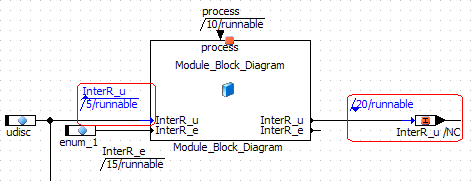
Start and stop of a protected sequence are displayed in blue, and marked with a small upward or downward triangle (see the  example). All sequence calls or block-local sequence calls with numbers between start and stop numbers are part of the sequence.
See also