Task Priorities
Each task is furthermore assigned to one of the following scheduling groups, preemptive or cooperative, and inside each group to one of the available priority levels. The number of priority levels for each scheduling group can be defined by the user, and determines the memory demand of the scheduler tables. It should be optimized for the final system.
Tasks at a higher priority than the running task can interrupt the running task. If the interrupting task belongs to the preemptive scheduling group, the running task is interrupted immediately, otherwise the interrupt happens at the end of the current process. Preemptive tasks always have a higher priority than cooperative tasks. The figure shows the priority scheme. The actually available tasks depend on the selected target.
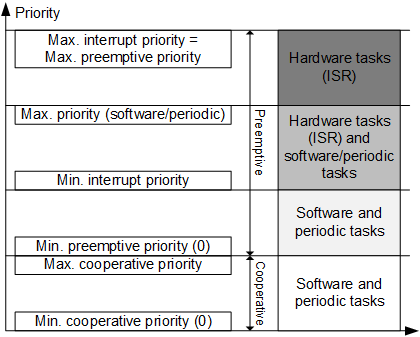
Each time a task is activated, the time elapsed since the previous activation is stored in the global variable dT. This variable can be used in the definition of algorithms to describe the control algorithms independent of their sample rate.
The OS editor allows to edit the maximum number of task priorities of an OS configuration. The table below shows default and maximum values for cooperative and preemptive task priorities, as well as the maximum total number of task priorities.
Target + OS | default no. of | max. no. of | total max. no. of levels | ||
|---|---|---|---|---|---|
coop. levels | preemp. levels | coop. levels | preemp. levels | ||
PC / generic | 0 | 20 | 0 | 20 | 20 |
Prototyping / generic | 100 | 100 | 100 | 100 | 100 |
ES910 / RTA-OSEK V5.0 | 32 | 32 | 253 | 253 | 253 |
RTPRO-PC / RTA-OSEK V5.0 | 32 | 32 | 32 | 32 | 64 |
ASCET‑SE targets / * | as specified in target.ini | as specified in target.ini | |||
Note |
|---|
The maximum total number of task priorities for ES910 is currently 253. Setting the max. cooperative and preemptive priorities to values whose sum exceeds the maximum total number of task priorities will lead to an invalid OS configuration. |
It is possible to increase the number of cooperative/preemptive levels up to the maximum cooperative/preemptive priority.
The semantic analysis of the OS configuration generates an error in the following cases:
- The sum of max. cooperative levels and max. preemptive levels is greater than the maximum priority for the target+OS combination, and a task actually has a priority that is too big.
- The maximum number of preemptive levels in the OS editor is greater than the maximum number of preemptive levels of the target+OS combination, and a preemptive task actually has a priority that is too big.
- The maximum number of cooperative levels in the OS editor is greater than the max. cooperative levels of the target+OS combination, and a cooperative task actually has a priority that is too big.
- The priority of a preemptive task is less than 0 or greater or equal than the maximum number of preemptive levels in the OS editor.
- The priority of a cooperative task is less than 0 or greater or equal than the maximum number of cooperative levels in the OS editor.
The semantic analysis of the OS configuration shall generate a warning in the following cases:
- The sum of max. number of cooperative levels and max. number of preemptive levels is greater than the maximum priority for the target+OS combination, and no task actually has a priority that is too big.
- The max. number of preemptive levels in the OS editor is greater than the max. number of preemptive levels of the target+OS combination, and no preemptive task actually has a priority that is too big.
- The max. number of cooperative levels in the OS editor is greater than the max. cooperative levels of the target+OS combination, and no cooperative task actually has a priority that is too big.
See also