Calibrating an Array or Matrix of Record Type
Note |
|---|
Arrays and matrices specified as explicit references cannot be calibrated. |
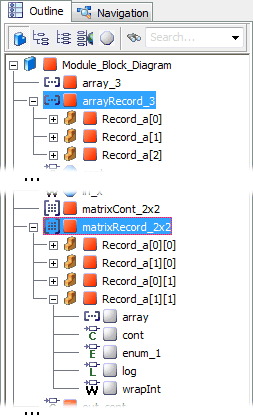
Each element of an array or matrix of record type is listed separately in the Outline tab of the experiment environment (see  this example). The number of array/matrix elements shown in the Outline tab corresponds to the max. size of the array/matrix, not to the current size. Each array/matrix element can be expanded to show the record elements. You cannot calibrate an array/matrix element itself, you have to calibrate its record elements.
In the Calibration Window combo box, select a calibration window.
This combo box offers the entry <New Calibration Editor>, as well as the existing calibration windows (e.g., Table Editor; 1 or Numeric Editor; 4).
- In the Outline tab, go to the element you want to calibrate (i.e. the array/matrix, a record inside the array/matrix, or an individual element of a record inside the array/matrix).
Do one of the following:
- In the Extras menu or in the elements' context menu, select Calibrate.
- Drag the elements from the Outline tab and drop them onto the Calibration Window combo box.
- Drag the elements from the Outline tab and drop them onto an existing calibration window.
Note
Drag & Drop works only if you selected individual record elements. The Calibration menu or context menu option works also for the array/matrix, or a record inside the array/matrix.
The following happens:
Selection
Result
array/matrix of record type
All elements in all records inside the array/matrix of record type are assigned to suitable calibration windows.
record inside array/matrix
All elements in the record are assigned to suitable calibration windows.
element of record inside array/matrix
The record element is assigned to a suitable calibration window.
If some elements need different calibration windows than the one selected in the Calibration Window combo box, one calibration window of each required type is created, and the respective elements are assigned. The initial values are read from the record data set used in the array/matrix element.
In the calibration windows, edit the values according to your needs, as described here:
- In the Window menu, select Update Calibration Windows to update the calibration windows content.
- In the Window menu, select Close Calibration Windows to close all calibration windows.
See also