Making Elements Accessible for External Communication
To make the elements accessible outside the conditional table, you must activate the get or set ports (if available) of the elements, or declare the elements as global. There is no other way of accessing elements in a conditional table.
- Select an element from the "Outline" tab.
Do one of the following:
- In the Edit menu, select Properties
- In the context menu, select Properties.
The properties editor opens. Depending on the element selected, the appearance of the properties editor may vary (see Element Configuration). The "Scope" field as well as the options Set() and Get() are always available.
 Use the Get/Set ports.
Activate the Set() option to add an input for the element.
The element can now be written from outside the conditional table.
Activate the Get() option to add an output for the element.
The element can now be read from outside the conditional table.
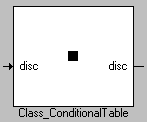
The inputs and outputs created in this way can be seen as connections in the layout of the conditional table.
Use global elements.
- Select the Imported option in the "Scope" field if the element was defined in another component/another project and is to be used in the conditional table.
- Select Exported if you define the element in the conditional table and want to use it in other components/projects.
See also
Element Configuration