Entering a Condition or an Instruction
Double-click the cell you want to edit.
The cell becomes an input box.
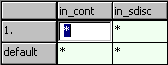
Enter the condition or the instruction.
Conditions and instructions are entered as pure character strings. Rules for conditions and instructions are given in Specifying Conditional Tables.
Note
No check is made to see whether different rows in the condition area contain identical conditions.
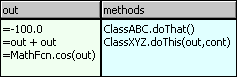
A cell in the instruction area can also contain several rows. Each row is interpreted as an individual assignment (see figure) or method call ("methods" column).
- Click somewhere in the table area to accept the entry.
See also