External Options
It is possible to include user-defined options. This takes place using an XML file which you modify to suit your own requirements. The file is stored in the ASCET installation directory; for ASCET to recognize it, it must have the extension *.aod.xml.
This topic contains three subsections:
- Basic Option Definition
- Meaning of the Attributes and Items
- Available optionClasses for User-Defined Options
Basic Option Definition
The definition of an option has the following basic format (code sections in bold italics must be replaced with suitable values for each option):
<OptionDeclaration
optionCategory="value"
attributeName="option name"
optionClass="type"
xmlCategory="path"
visible="value"
sensitive="value"
optionFile="filename.xml">
<Group>path</Group>
<Label>text</Label>
<Description>text</Description>
<Tooltip>text</Tooltip>
<InitialValue>value</InitialValue>
<DefaultValue>value</DefaultValue>
</OptionDeclaration>
The meaning of the attributes and items is listed in Table 1.
Some option types have additional items, these are described in Table 2.
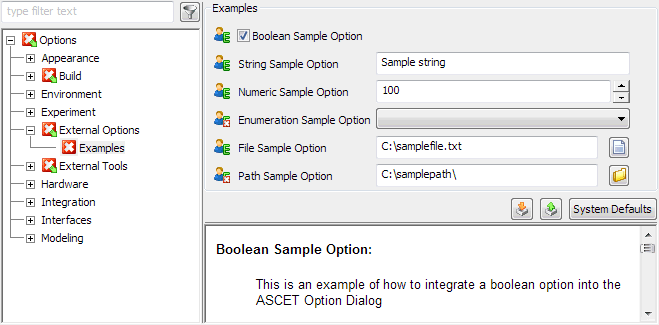
Your installation disk contains the sample file externalOptionsExample.aod.xml; see also Example: External Options File. This file defines the options shown here:
Meaning of the Attributes and Items
This table describes the attributes and items of the basic option definition.
Attribute/Item | Meaning |
optionCategory | Way the option is saved (FILE – in a file, FIXED – not saved). |
attributeName | Name of the option in the XML file from optionFile. Has to be unique in the *.aod.xml file. |
optionClass | Type of option, for possible values see Table 2. |
xmlCategory1 | Path under which the option in the XML file from optionFile is stored, e.g. Sample\Option. |
visible2 | Determines whether the option is visible (visible="true") or not (visible="false"). |
sensitive2 | Determines whether the option can be edited (sensitive="true") or not (sensitive="false"). |
optionFile1 | XML file in which the value of the option is stored. |
<Group> | Path (Node\Subnode\...) of the option in the ASCET options window, either new or existing. |
<Label> | Name of the option in the ASCET options window. |
<Description> | Short description of the option. Will be shown in the bottom right field of the ASCET options window. |
<Tooltip> | Tooltip text of the option in the ASCET options window. |
<InitialValue> | Initial value, is only used if no value from optionFile is saved in the XML file. |
<DefaultValue> | Default value, is used for System Defaults and as an initial value if <InitialValue> is not set. |
1: The values of several options can be stored in the same XML file and/or under the same path. 2: Can be omitted. Treated as true, if omitted. | |
Available optionClasses for User-Defined Options
This table describes the optionClasses available for the creation of user-defined options. If an optionClass requires more items than the basic definitions, or special settings for the basic definition, these are listed here, too.
Code sections in italics must be replaced with suitable values for each option.
optionClass | Explanation |
EtasBooleanOption | Option box, can be activated or deactivated |
EtasButtonOption | Button that executes a command. <InitialValue> and <DefaultValue> are left empty or set to ignored. Additional items for the definition: <ButtonOption> <Action>path/executable file</Action> </ButtonOption> |
EtasEnumerationOption | Combo box for selecting a character string. Additional items for the definition: <EnumerationOption> <StringValues>1 <StringValue>string1</StringValue> ... <StringValue>stringN</StringValue> </StringValues> <Values>2 <Value>value1</Value> ... <Value>valueN</Value> </Values> </EnumerationOption> |
1: The string values string1 .. stringN appear in the combo box. 2: The numerical values represented by the string values. If omitted, value1 .. valueN are set to the integer numbers 0 .. n-1. | |
EtasEditableEnumerationOption | Combo box for selecting a character string, plus an Edit button. Additional items for the definition: <EnumerationOption> <StringValues>1 ... </StringValues> <Values>2 ... </Values> <Action>path/executable file</Action> </EnumerationOption> |
1: Same as <StringValues> for EtasEnumerationOption 2: Same as <Values> for EtasEnumerationOption | |
EtasFileOption | Text field for path and name of a file as well as a button for file selector window. Additional items for the definition: <FileOption> <DialogTitle>text</DialogTitle> <SearchPath>path</SearchPath> <SearchMask>mask</SearchMask> <InvalidCharacters>characters</InvalidCharacters> <FilterTypes> <FilterType filter> <Description>text</Description> </FilterType> ... </FilterTypes> </FileOption> |
EtasFloatOption | Additional items for the definition: <FloatOption>1 <MinValue>value</MinValue> <MaxValue>value</MaxValue> </FloatOption> |
1: Can be omitted. If <FloatOption> is omitted, the option can have values between -100000.0 and 100000.0. For min/max values beyond ]-100000.0 .. 100000.0[, you must use <FloatOption>. | |
EtasNumericOption | Entry field with arrow buttons for integer values. Additional items for the definition: <NumericOption>1 <MinValue>value</MinValue> <MaxValue>value</MaxValue> </NumericOption> |
1: Can be omitted. If <NumericOption> is omitted, the option can have values between -99999 and 99999. For min/max values beyond [-99999 .. 99999], you must use <NumericOption>. | |
EtasPathOption | Text field for directory path button for Path Selection window. |
EtasStringOption | Text field for entering a character string. |