Generating a Default Matrix
You can now specify the input and output values as described in Specifying Inputs and Outputs. Instead of editing each value by hand, you can generate a default matrix automatically.
- Create the desired number of inputs.
Click the Default Matrix button.
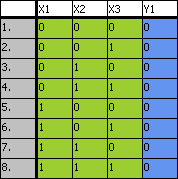
Enough combinations are created to include every possible input setting. The number of outputs is unchanged; all output values are set to 0 (false). If, for example, you have created three inputs and one output, Default Matrix will give the following result:
See also