Using the Characteristic Line as Method Argument
Place the complex argument in the drawing area.
Unlike with matrix and array arguments, you cannot access the pins of the characteristic line. Therefore, you have to pass it to a local characteristic line.
- Create and set up a characteristic line (
 ), and place it in the drawing area.
 Right-click the characteristic line, and select Get/Set Ports from the context menu.
Characteristic tables are created as parameters, i.e. they cannot be written from within the program. Thus, only the Get port is made available.

Open the properties window for the characteristic table, and assign the kind Variable (see Element Configuration).
Now the Set port is available, too, and you can assign the complex argument to the characteristic line.
Connect the argument output to the Set port of the characteristic line.
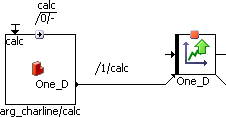
Select the sequence number 1 for the sequence call, so that the assignment is executed as the first step of the method.
Note
If this assignment is not performed as the first step of the method, inconsistencies arise.
You can now analyze the characteristic line as usual. Data are read from the memory area in which the characteristic line passed as argument is located.
See also
Passing the Characteristic Line as Method Argument
Characteristic Lines and Maps as Arguments