Performing the Calculation
- Create a class or module.
Open the default project and permit using references without initialization.
Note
Be very careful when you use this permission outside the present example. If you do, it is solely your responsibility to ensure proper initialization of references.
- In the Insert menu, select Component to include the computation class as a complex element.
- Create two matrices of type cont, and fill them with the input data.
- Create a third matrix of the same type and size for the result.
Place the elements in the drawing area, and connect them as shown below.
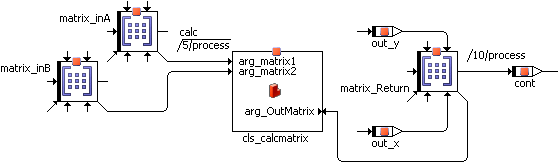
Use the output pins of the result matrix to read it.
Note |
|---|
When you assigned a size to these matrices other than the preset values in the Properties dialog, the code generation will produce an error message of the following kind: type mismatch: expected <mat[cont][3@3]> (<matrix name>), got <mat[cont][x@y]> (<matrix name>) |
A frequently tried approach to return a matrix or an array is to add a return value of the respective type to a method, and access the return value via the Get/Set ports. The following figure shows such an arrangement, the class cls_calcmatrix contains the calc method with two matrix arguments and a matrix return value.
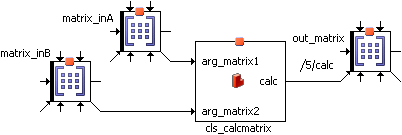
This does not work! The ports transfer pointers, in this case, pointers to a structure within the method. This structure, though, is only available while the method is computing – which means that, in the example, the data no longer exist at the time of the assignment to out_matrix.
See also