Using Temporary Variables
Note |
|---|
Temporary variables are deprecated; they will be removed in a future ASCET version. |
To use temporary variables in a block diagram, proceed as follows:
- Make sure that the Disable BDE Temp Variable Generation option in the Optimization node of the parent project properties is deactivated.
- Right-click the operator or class or hierarchy/statement block output pin to which you want to add a temporary variable.
Select Temporary Variable from the context menu.
The operator displays a solid rectangle on the output pin to indicate that the result of the operation is stored in a temporary variable.
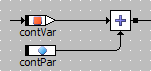
- Repeat the command to remove the temporary variable.
See also