Connection Popup Window
If the Display Connection Port Selection Box option (ASCET options window, Block Diagram node) is activated, this window pops up if the connection mode is active and the mouse pointer hovers over the body (not a pin) of a graphical element.
The popup window lists all pins available for the current connection.
all unconnected pins of the graphical element (if you are starting a connection)
or
- all suitable unconnected pins, i.e. all pins where the current connection could end
Each list entry consists of an icon and a name.
 denotes an input pin (including arguments with the direction Out)
- -- denotes an output pin
- the name is derived from the method and the element associated with the pin: <method name>::<method element name>
 EXAMPLES EXAMPLES |
|---|

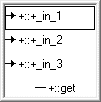

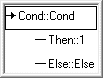
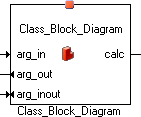
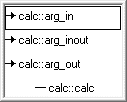
If you do not want to see the connection popup window, open the ASCET options window, go to the Block Diagram node and deactivate the Display Connection Port Selection Box option.
See also
Connecting Diagram Elements (block diagram editor)
Connecting Diagram Elements (software component editor)