Adding Implementation Casts to Operators Automatically
Note |
|---|
The procedure only works if none of the inputs and outputs of the operator is directly connected to an implementation cast. Otherwise the following error message appears: This operator is already connected to at least one implementation cast. Please specify further implementation casts individually. |
- Select the operator which is to have implementation casts added to it.
Right-click the operator and select Add Implementation Cast from the context menu.
If there is sufficient space in the drawing area, implementation casts are added to all connections with inputs and outputs of the operator.
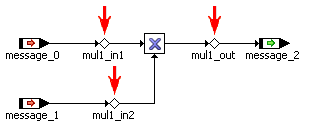
The implementation casts are named automatically in accordance with the  following scheme.
See also